Women Surround

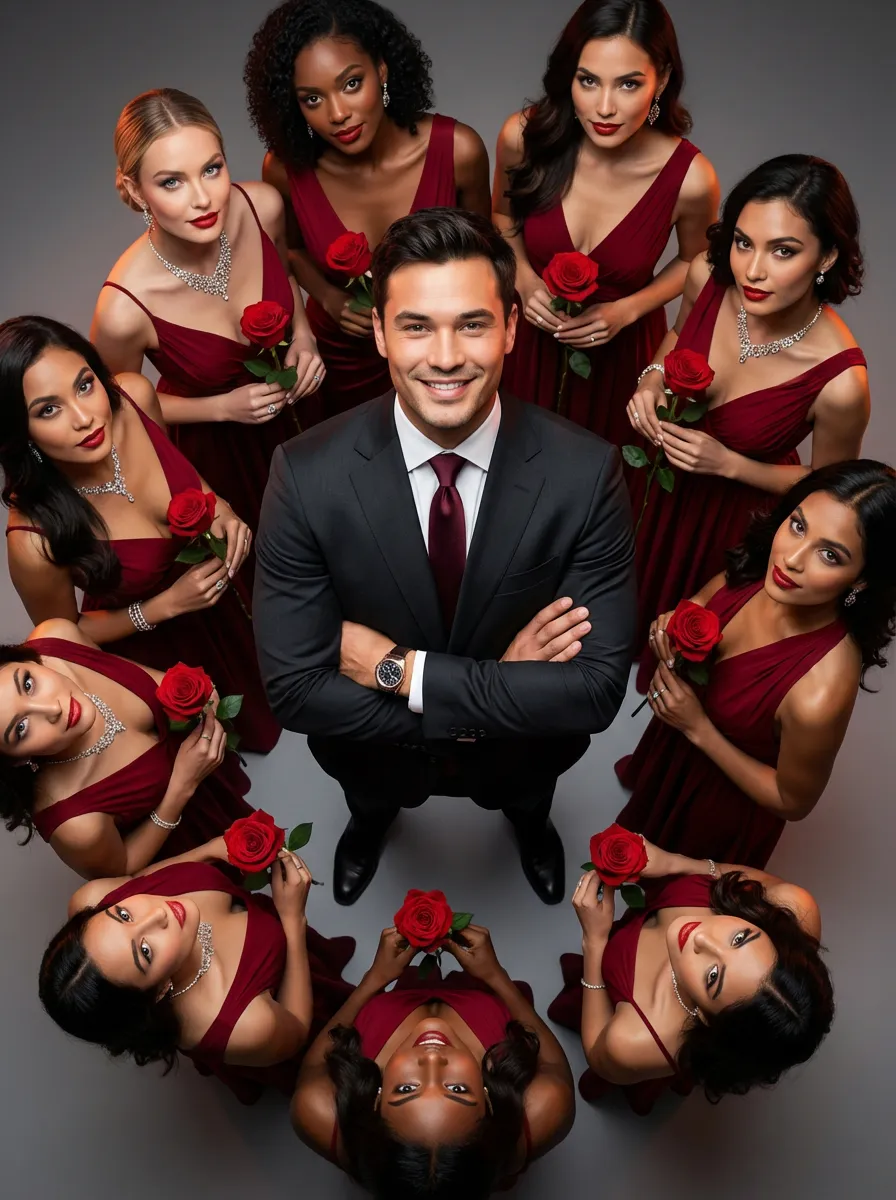
The main figure in the uploaded picture, who is smiling confidently (with unchanged facial features, gender and age), is the subject. He is wearing a well-tailored high-end custom suit, with a red bow tie, a high-end watch, and crossed arms. Surrounding her are 8 to 9 beautiful women in fashionable red high-end custom dresses (wearing luxurious accessories), each holding a fresh red rose. These women are arranged in a circular pattern around the central figure on a deep purple red solid background. The color scheme indicates: high-intensity cinematic lighting effects, soft yet dramatic shadows, moderate contrast, rich depth of field effects, smooth skin texture, luxurious and romantic atmosphere, with a faint highlight on the facial features. Color hint: Predominantly rich deep red and dark black, natural and transparent skin tones, high saturation but not overexposed colors, unified and high-end color combinations with warm tones, bright light and shadow contrast. Style supplement: Fashion-forward art, fashion portrait photography, elegant and charming atmosphere, reminiscent of a luxurious Valentine's Day social event.

Use Template
arrow
Women Surround

More From VIVAGO AI

Become Star

Medium-close-up shot (showing the upper body of the protagonist): The scene shown in the uploaded picture (retaining the protagonist's facial features, gender and age), a fashionable and exquisite hairstyle, exquisite clothing, wearing a complete set of high-end custom leather fashion clothing, wearing exquisite accessories, wearing cool and fashionable sunglasses, a natural standing posture. There are many paparazzi holding cameras surrounding and taking pictures of the protagonist. The flashes are flashing. The artistic style is fashionable and avant-garde, the photography style is realistic, the background is the São Paulo Cathedral in Brazil, the magnificent church building, clear perspective effect, night lighting, high detail level, high-definition quality, fashionable photography style, avant-garde photography art, film-like photography style, film texture, top-notch film lighting effect.

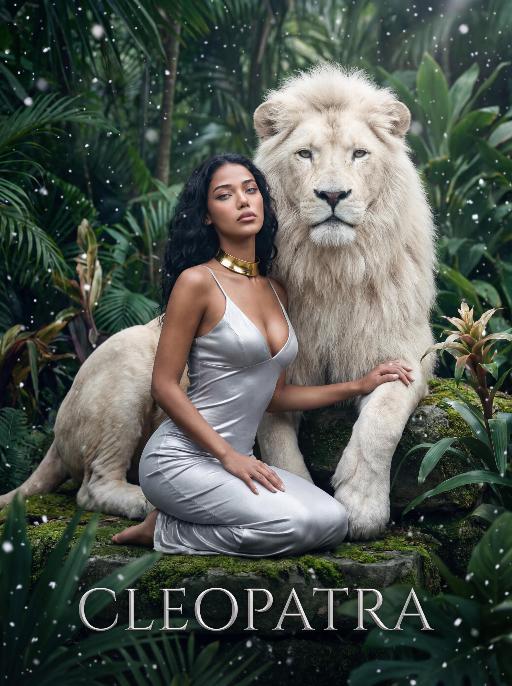
White Lion AI effects generated image

White Lion

The character in the uploaded picture (unchanged facial features, gender and age). A striking woman embodying the persona of Cleopatra, seated gracefully beside a majestic white lion. She has long, wavy black hair cascading in soft waves, her eyes wide open, head tilted slightly upward, exuding an air of disdain and supreme confidence, as if looking down on all before her. The white lion, with its pure white fur and powerful build, sits calmly behind her, one paw resting gently on her shoulder, looking directly at the viewer with a calm, noble demeanor. She wears a form-fitting silver spaghetti-strap dress with a deep V-neckline, accentuating her figure. Around her neck, she wears a bold gold choker necklace. She kneels on a moss-covered stone in a lush, dense tropical jungle, one hand resting lightly on the lion's leg. The scene is filled with large, vibrant green tropical foliage (like palm fronds and monstera leaves), and delicate snowflakes are falling gently, creating a surreal and magical atmosphere. The setting is a mysterious, ancient jungle, with the air filled with falling snow, contrasting the lush greenery with the cool white of the snowflakes. At the bottom of the image, the word "CLEOPATRA" is displayed in an elegant, silver serif font. The image is rendered in a cinematic, fantasy art style, with dramatic, high-contrast lighting that highlights the sheen of the silver dress, the texture of the lion's white fur, and the richness of the green jungle. The color palette is ethereal, featuring deep greens, cool whites, and the metallic sheen of the silver and gold, creating a mysterious, regal, and timeless atmosphere. The overall aesthetic is detailed, evocative, and reminiscent of a fantasy movie poster

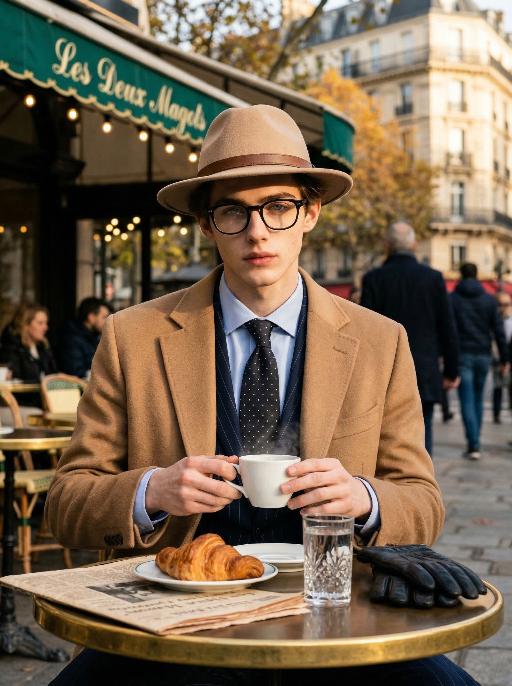
Cafe Gent AI effects generated image

Cafe Gent

Preserve the character's facial features and hairstyle exactly as in the reference image. He wears sophisticated black-rimmed glasses, a timeless beige fedora with a refined brown leather band, a tailored camel cashmere overcoat, a dark navy subtle pinstripe suit, a crisp light blue dress shirt, a dark silk polka-dot tie, and black leather gloves resting on the table. He is seated at an outdoor table at the iconic Les Deux Magots café in Paris, gently holding a white ceramic coffee cup with both hands, delicate steam curling upward. Table details: round polished brass tabletop, a crystal glass of still water, a half-eaten buttery croissant on a porcelain plate, a vintage French newspaper, and elegant black leather gloves. Background: the signature green awning of Les Deux Magots, warm vintage string lights, softly blurred Parisian pedestrians, rich autumnal foliage, classic Haussmannian architecture in gentle bokeh. Lighting & Style: strong golden hour light and shadow contrast, dramatic chiaroscuro lighting on the face, partial sunlight gilding one side of his face while the other remains in soft shadow, high contrast key light, warm muted color grading, ultra-shallow depth of field, cinematic film photography, quiet luxury & old money aesthetic, hyper-realistic textures, intricate details, 8K, professional high-end fashion & travel editorial photography, shot on Sony A7R IV with 85mm f/1.4 lens, film grain, elegant composition, sophisticated atmosphere.

Hollywood Star AI effects generated image

Hollywood Star

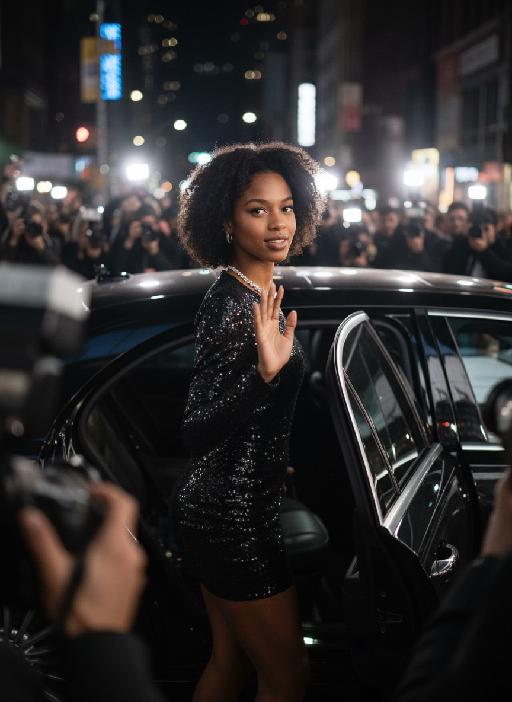
A medium close-up shot from a frontal perspective with a slight upward tilt, the camera angle is slightly tilted forward. This shot was taken using a professional full-frame digital SLR camera and a 50mm f/1.2 wide-angle fixed-focus lens. The uploaded image shows a person (with unchanged facial features, gender, age, and hairstyle), wearing a tight black sequined sexy dress and wearing high-end custom accessories. This figure is preparing to get into a black luxury car with open doors. The figure turns halfway and looks at the camera, raising one hand and making a gentle waving or shielding gesture. The person has a relaxed and confident smile on their face, with bright and expressive eyes. The scene is on a night-time city street, illuminated by a group of paparazzi and a large number of flashes, creating a high-contrast light and shadow effect, with shadows and bright highlights, and the foreground also includes cameras and flashes, creating the feeling that the celebrity figure is surrounded by paparazzi and cameras. This aesthetic style is the street style of Hollywood celebrity paparazzi, featuring grainy film texture, clear focus on the subject, blurred background and dark tones. The person's face is illuminated by the flash, and the makeup characteristic of the figure is exaggerated false eyelashes, clear cheekbones, nude matte lip color and bright highlights used to enhance the three-dimensionality; the picture adds dark corners at the four corners and bright parts in the middle, creating a strong contrast between light and shadow.

Advanced Image

Strict identity verification is carried out using the uploaded avatar (maintaining consistency in facial features, hair, skin tone and age). The composition frames the head and shoulders from the top of the head to the upper chest; the face is angled three-quarters to the left and slightly downward, with the chin gently tucked, eyes almost straight to the camera, a stern and cold expression, and lips firmly closed, featuring a sharp jawline and a straight nose. The short black hair is slightly tousled with a few strands falling onto the forehead, styled to have a subtle sheen to its texture. He is wearing a pure black long-sleeved turtleneck sweater with the collar snugly wrapped around the neck. Set against an off-white interior background, his left hand is raised with the index finger touching the temple, the other fingers curled, and a large, prominent silver signet ring adorns his finger, clearly visible against the black sleeve. Soft studio key light streams in from the upper left (the camera’s left), casting intense highlights on the left side of the face and deep shadows on the right side. The background gradients from grey to white, with a faint vertical gradient light strip on the right side. The entire image is in full black and white with no color, only grayscale tones, boasting extremely stark contrast and exquisitely sharp details. It features a studio lighting style, portrait photography aesthetics, and an avant-garde fashion black-and-white photography style.

Load more

Next-Gen Multi-Model AI Video Architecture

Vivago AI isn't just one engine—it’s a unified hub for the world’s most advanced video AI. Whether you need cinematic realism or high-speed social content, we provide the right model for your creative vision.

Free Generate


Beauty and Dolphins

Vacation Time

Stellar Tear

Fish Tank Supervisor

Cinematic Quality & Precision Control

Enables 4K resolution with multi-lens motion control, generating delicate scene via text prompts for customized cinematography.​

TRY NOW

Dynamic AV Sync

Auto-generates original audio to avoid copyright issues. Build 3D immersive environments through layered sound design automatically.

TRY NOW

OpenAI Sora 2

​Advanced visual storytelling with unparalleled physics and consistency.

TRY NOW

Kling v2.6 Pro

Industry-leading cinematic image animation and motion control.

TRY NOW

Google Veo 3 & 3.1

Ultra-fast generation with enhanced realism for creative workflows.

TRY NOW

Vivago AI 2.0

Our proprietary model optimized for efficiency, speed, and cost-effective generation.

TRY NOW

Users' Voice

We listen carefully to the opinions of every user.
Free Generate
Contact Us
I tried the Lip Sync feature inside Vivago.ai’s AI Video Generator for my educational podcast, and the results were stunning! The avatar's lip movements perfectly matched my audio recording, creating a professional AI-generated video without complex editing. Compared with tools like OpenAI Sora 2 and Google Veo 3.1, Vivago Image-to-Video delivers fast, studio-quality results online. It saved me hours of post-production work.
ElenaM (Spain)
Vivago’s Image-to-Video AI transformed my marketing workflow. I uploaded a product image and described the launch scene in text, and it generated a 10-second cinematic AI video with background music and dynamic visuals. The output quality rivals Kling v2.6 Pro and Google Veo 3 Fast. It’s now my go-to AI video generator for social media ads and product campaigns.
KenjiT (Japan)
As a digital artist, I use Vivago.ai 2.0 daily for Image-to-Image and AI Image-to-Video creation. The e-book covers and animated visuals I generate for clients look cinematic and professional. Unlike many standalone AI tools, Vivago integrates multiple leading models into one platform, making it easier to create copyright-safe AI images and videos for publishing.
ChenL (China)
I tried the Lip Sync feature inside Vivago.ai’s AI Video Generator for my educational podcast, and the results were stunning! The avatar's lip movements perfectly matched my audio recording, creating a professional AI-generated video without complex editing. Compared with tools like OpenAI Sora 2 and Google Veo 3.1, Vivago Image-to-Video delivers fast, studio-quality results online. It saved me hours of post-production work.
ElenaM (Spain)
Vivago’s Image-to-Video AI transformed my marketing workflow. I uploaded a product image and described the launch scene in text, and it generated a 10-second cinematic AI video with background music and dynamic visuals. The output quality rivals Kling v2.6 Pro and Google Veo 3 Fast. It’s now my go-to AI video generator for social media ads and product campaigns.
KenjiT (Japan)
As a digital artist, I use Vivago.ai 2.0 daily for Image-to-Image and AI Image-to-Video creation. The e-book covers and animated visuals I generate for clients look cinematic and professional. Unlike many standalone AI tools, Vivago integrates multiple leading models into one platform, making it easier to create copyright-safe AI images and videos for publishing.
ChenL (China)
I absolutely love Vivago’s AI Image-to-Video Generator. As a travel blogger, static images often fail to capture real atmosphere, but Vivago helps me turn photos into vivid cinematic AI videos with motion effects. It feels comparable to OpenAI Sora 2 and Google Veo 3.1, but more accessible and faster for creators who need high-quality AI videos online.
LiamK (Australia)
I tried the Lip Sync feature inside Vivago.ai’s AI Video Generator for my educational podcast, and the results were stunning! The avatar's lip movements perfectly matched my audio recording, creating a professional AI-generated video without complex editing. Compared with tools like OpenAI Sora 2 and Google Veo 3.1, Vivago Image-to-Video delivers fast, studio-quality results online. It saved me hours of post-production work.
ElenaM (Spain)
Vivago’s Image-to-Video AI transformed my marketing workflow. I uploaded a product image and described the launch scene in text, and it generated a 10-second cinematic AI video with background music and dynamic visuals. The output quality rivals Kling v2.6 Pro and Google Veo 3 Fast. It’s now my go-to AI video generator for social media ads and product campaigns.
KenjiT (Japan)
As a digital artist, I use Vivago.ai 2.0 daily for Image-to-Image and AI Image-to-Video creation. The e-book covers and animated visuals I generate for clients look cinematic and professional. Unlike many standalone AI tools, Vivago integrates multiple leading models into one platform, making it easier to create copyright-safe AI images and videos for publishing.
ChenL (China)
I absolutely love Vivago’s AI Image-to-Video Generator. As a travel blogger, static images often fail to capture real atmosphere, but Vivago helps me turn photos into vivid cinematic AI videos with motion effects. It feels comparable to OpenAI Sora 2 and Google Veo 3.1, but more accessible and faster for creators who need high-quality AI videos online.
LiamK (Australia)
Using Vivago.ai’s Image-to-Video AI has greatly enhanced my classroom teaching. I transform textbook notes into historical AI videos with cinematic filters and dynamic animations. Compared with tools like Kling v2.6 Pro and Google Veo 3 Fast, Vivago offers faster generation and easier parameter control for educators who need reliable AI video creation.
RajivG (India)
I frequently create AI videos on Vivago and publish them on TikTok and YouTube Shorts. The AI video templates and trending content ideas help me produce viral-ready clips quickly. With Vivago’s integrated models—including advanced video engines similar to OpenAI Sora 2—I can generate anime-style and cinematic social media videos that drive high engagement.
MarieJ (Spain)
What attracts me most about Vivago.ai is not only the powerful AI Video Generator but also the active AIGC creator community. It combines AI Image-to-Video, Text-to-Video, and leading model integrations like Google Veo 3.1 into one creative platform.
TomW (India)
At first, I was hesitant about using AI video tools. But after trying Vivago Image-to-Video, I realized how easy it is to create professional AI-generated videos online. I just upload an image, add a short prompt, and adjust a few settings. The results are cinematic and copyright-safe, which is essential for commercial projects.
HectorC (Mexico)
Using Vivago.ai’s Image-to-Video AI has greatly enhanced my classroom teaching. I transform textbook notes into historical AI videos with cinematic filters and dynamic animations. Compared with tools like Kling v2.6 Pro and Google Veo 3 Fast, Vivago offers faster generation and easier parameter control for educators who need reliable AI video creation.
RajivG (India)
I frequently create AI videos on Vivago and publish them on TikTok and YouTube Shorts. The AI video templates and trending content ideas help me produce viral-ready clips quickly. With Vivago’s integrated models—including advanced video engines similar to OpenAI Sora 2—I can generate anime-style and cinematic social media videos that drive high engagement.
MarieJ (Spain)
What attracts me most about Vivago.ai is not only the powerful AI Video Generator but also the active AIGC creator community. It combines AI Image-to-Video, Text-to-Video, and leading model integrations like Google Veo 3.1 into one creative platform.
TomW (India)
At first, I was hesitant about using AI video tools. But after trying Vivago Image-to-Video, I realized how easy it is to create professional AI-generated videos online. I just upload an image, add a short prompt, and adjust a few settings. The results are cinematic and copyright-safe, which is essential for commercial projects.
HectorC (Mexico)