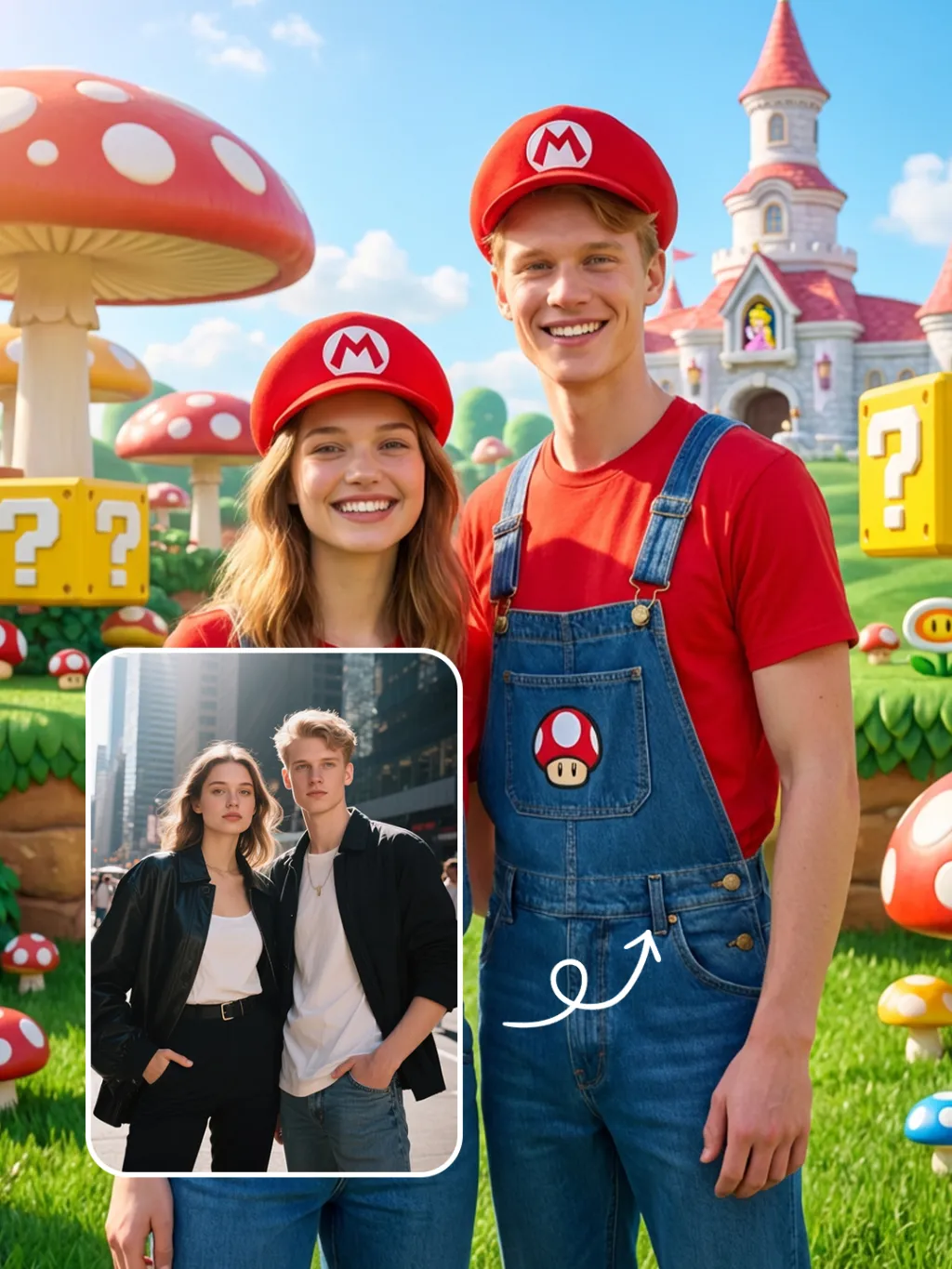
Costume Change

将参考照片中的两位人物,替换为马里奥风格的Cosplay造型:服装是红色上衣+蓝色背带裤,头戴带有白色圆形红“M”标志的红色帽子,人物开心得笑起来;场景为超级马里奥蘑菇王国,背景包含巨型红色白点蘑菇、黄色问号砖块、卡通城堡,草地+蓝天环境;风格是超写实风格,保留人物面部特征,光线为明亮的户外自然光,整体氛围活泼童趣;细节上加入蘑菇造型装饰,保持人物与场景的比例协调。

Use Template
arrow
Costume Change

More From VIVAGO AI

Lens Heartbeat AI effects generated image

Lens Heartbeat

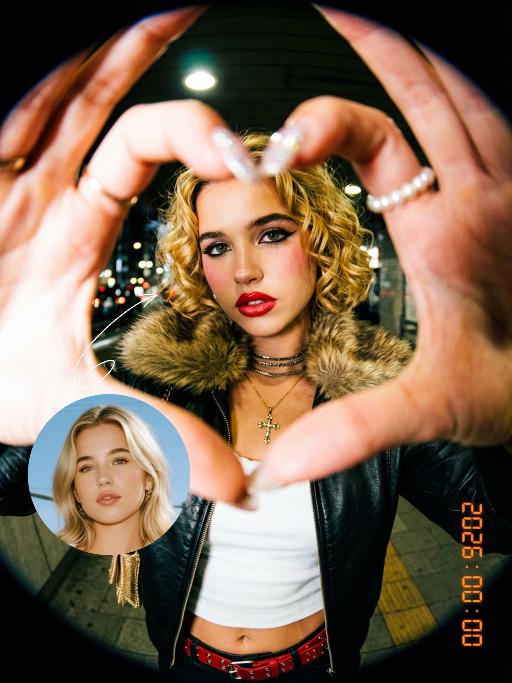
The uploaded figure (with unchanged facial features) forms a heart shape with both hands in front of the lens for a framed composition, featuring a shallow depth of field (the large, tilted hands in the foreground are slightly blurred). This is a portrait photoshoot in the ppgalclub style, with Japanese Shibuya Y2K fashion styling. Captured in a fisheye lens close-up (strong fisheye distortion with slight stretching at the frame edges) from a slightly low-angle perspective, the figure is centered to fill the entire frame. The figure has short, curly golden bob hair and bold makeup (thick black eyeliner + plump red lips + translucent pink-toned blush), leaning forward with the face facing the camera directly. The outfit includes a black leather vest with a fur collar, a white camisole, a red stud-embellished belt (with a cropped waist design), a golden cross necklace paired with multi-layered metal chokers, sequin-embellished nail art, pearl-encircled rings, and a small golden chain bag. The scene is set in a Shibuya underground passage at night, with dim artificial lighting and a high-intensity flash fired directly at the figure (creating stark light and shadow contrast, prominent highlights on the figure’s face, and a dark-toned background), plus blurred bokeh light spots in the background. The image features film grain texture, a highly saturated black/gold/red color scheme, and ultra-high-definition details; a black fisheye lens vignetting frames the entire image, and an orange vertical digital date watermark (2026:00:00) is added to the bottom right corner.

Indian Dancer

The figure in the uploaded image (with unchanged facial features) has smooth, luminous skin and a well-defined facial contour, with sleek, glossy hair styled in loose waves. She wears understated burgundy lipstick, has deep brown almond-shaped eyes with subtle smoky eye makeup, and a small red bindi on her forehead. Standing front-on and gazing at the camera, her long black curly hair cascades over her shoulders. She is dressed in an exquisite choli (blouse) with golden thread embroidery, adorned with numerous turquoise/red gemstones, pearl inlays, black spaghetti straps and beaded tassels; exuding intense sexiness, the outfit bares her waist and bust line, paired with a flowy turquoise silk lehenga (traditional Indian long skirt) and a wide, opulent kamarband (golden waist belt) inlaid with red gemstones and strung with golden bells. A full set of golden accessories adorns her: a maang tikka (forehead ornament with gemstones and pearls) in her hair, large chandelier earrings, a fitted pearl and gemstone necklace, bangles (bajuband), and delicate bracelets. Background: Luxurious blurred golden bokeh (flash lighting), warm and dramatic side lighting, studio portrait, 8K resolution, rich details on the face and accessories, and a sharp, clear frame.

Cross Earth

"Generate based on the user-uploaded reference image while preserving the subject’s core identity and recognizable features. This includes but is not limited to: subject category, facial structure, proportions, eye characteristics, fur/skin/material texture, color distribution, body traits, age impression, temperament, clothing traits, accessories, and overall recognizability. Whether the uploaded subject is a cat, dog, man, woman, baby, animal, toy, doll, or any other kind of subject, it must remain the same subject. Do not replace its identity, do not significantly alter the face, and do not remove its most recognizable features. Transform the subject into a travel souvenir portrait taken at Christ the Redeemer in Rio de Janeiro, Brazil, on top of Corcovado Mountain. The location must be explicit and fixed: the massive Christ the Redeemer statue must appear clearly in the background, with its stone structure and outstretched arms visible behind the subject, positioned slightly left-behind or directly behind at a higher elevation. The surrounding view must show the elevated panoramic landscape of Rio de Janeiro, including the city below, the bay, water, islands, mountain forms, coastline, and the iconic mountain-and-sea urban geography. The setting must clearly look like the observation area on Corcovado Mountain, and must not be changed into any other city, statue, monument, or mountain viewpoint. The subject should stand in the foreground near the camera in a sightseeing photo pose. If the subject is human or humanoid, use a semi-profile standing pose: the body is turned slightly away or sideways, while the head turns back toward the camera with a smile, creating a natural travel-photo feeling. If the subject is an animal, pet, or non-human figure, adapt it into a cute upright or semi-upright display pose suitable for the same setting, with the body angled slightly sideways and the head turned toward the camera, creating a “looking back at the camera” travel-photo effect. The overall pose should feel natural, relaxed, friendly, and photogenic, like a tourist landmark portrait. The subject’s outfit should remain as close as possible to the original uploaded image. If minimal scene adaptation is needed, only make very slight natural adjustments, but do not change the clothing type, main colors, mood, or recognizability. Do not force a costume change, do not add excessive accessories, and do not break the subject’s identity. The background must be strongly locked to the Christ the Redeemer viewpoint: the large Christ the Redeemer statue is clearly visible behind the subject; below is the panoramic cityscape of Rio de Janeiro with dense urban buildings; farther away there is a visible bay, water, islands, hills, and iconic coastal geography; the perspective is clearly elevated and scenic, like a famous tourist lookout; the sky is clear blue with warm sunlight; the image should feel like real travel photography, not studio photography or a generic artificial backdrop.** Composition should be vertical, medium-to-half-body, three-quarter-body, or full-body framing. The subject should preferably stand on the right or front-right side of the frame so the Christ the Redeemer statue can remain clearly visible in the background for a classic tourist-photo composition. The camera is eye-level or slightly low. The subject must be sharp, and the landmark must remain clearly recognizable. Depth of field should be natural, without overly blurring the statue or city skyline. Lighting should be natural daylight, preferably warm afternoon or golden-hour sunlight. Skin/fur/material rendering should be realistic, with a clear, bright, airy image. Colors should be vivid but not exaggerated. The overall style should be high-quality realistic travel photography with a subtle polished commercial feel. Key constraints: The uploaded subject’s core identity and recognizability must remain intact; do not replace or redesign the subject; The location must be fixed at Christ the Redeemer, Rio de Janeiro, Brazil, on Corcovado Mountain; The background must clearly include the Christ the Redeemer statue and the panoramic cityscape of Rio; The subject must appear in a natural travel souvenir / landmark photo pose; Must work for all species and subject types; The final result should resemble a real travel photograph."

Travelling pets

The features of the figure in the uploaded image remain unchanged (the animal stands fully upright on its hind legs with a vertical torso and forelimbs hanging naturally at its sides; the original animal’s species, facial features and texture details are strictly preserved). The animal is dressed in a well-fitted black jacket, a matching pair of khaki cropped pants, retro hiking boots, and also wears a bucket hat with black-rimmed windproof sunglasses. The background is replaced with the scene of the Golden Mountains bathed in sunlight in Western Sichuan, with a glistening lake in front of the mountains reflecting the golden peaks. The figure stands on the shore in front of the lake, in an ultra-realistic photography style that blends avant-garde and fashion-forward pet photography aesthetics.

Love AI effects generated image

Love

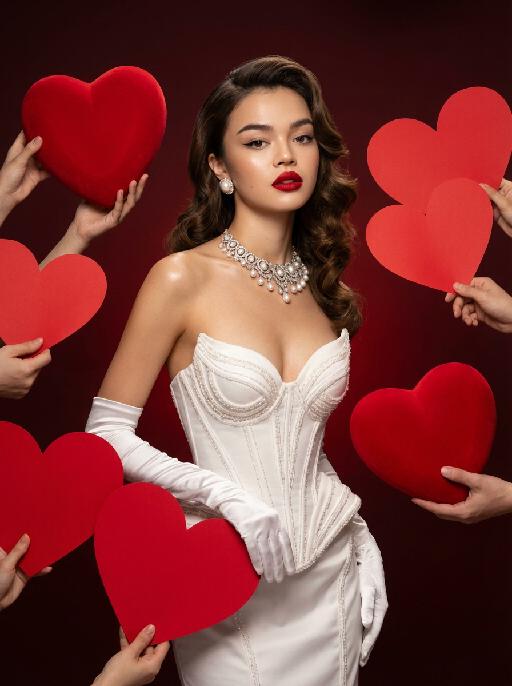
Medium shot, the character in the uploaded picture (unchanged facial features, gender and age) with a vintage Hollywood big wavy hairstyle, wearing a strapless white corset high couture gown, paired with long white satin gloves, pearl stud earrings and a high couture custom necklace. The character has exquisite makeup with classic red lip color and cat eye makeup, profound eyes and an elegant expression. Surrounded by oversized, bright red three-dimensional velvet heart-shaped props held up by multiple hands, with a gradient low-saturation dark red background. Also, numerous hands holding large, vivid red paper heart props are around the character. Lighting & Tone: Adopt vintage Hollywood-style soft studio lighting, create clear and luminous skin complexion, form a striking contrast between the white costume and the bold red background/heart patterns, with bright lighting contrast, rich and retro color palette, smooth and glossy skin texture, presenting professional fashion photography aesthetics and avant-garde fashion photography artistic sense.

Girlfriend

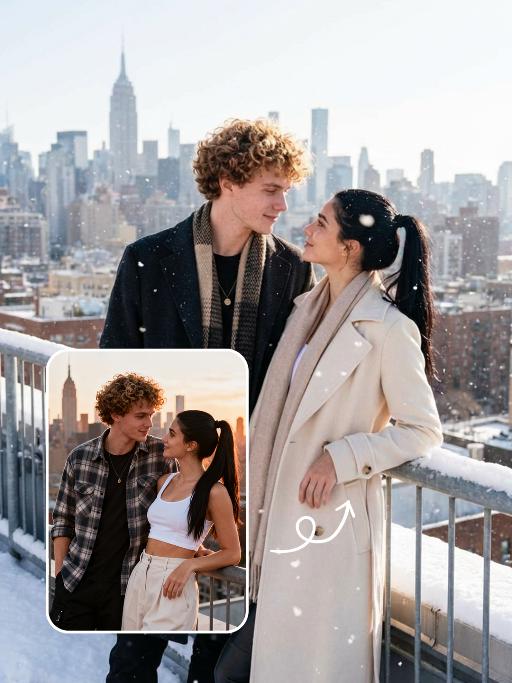
In the uploaded picture, that person (with unchanged facial features) is wearing a well-tailored and high-quality black custom suit and a sophisticated watch. Next to her sits a beautiful woman in a flowing deep red strapless dress, wearing exquisite accessories, with the skirt extending all the way to the ground. This couple, filled with romantic atmosphere, is inside a huge deep red inflatable hot air balloon basket (decorated with abundant romantic roses). They bump their glasses together and gaze deeply into each other's eyes. Below is the cityscape of Paris, and on the left, the Eiffel Tower is clearly visible. Surrounding it are floating heart-shaped red hot air balloons. The scene is set at the golden hour of sunset, with the sky presenting a warm orange-yellow color. The soft background light creates a hazy film-like glow, with low color saturation, soft contrast between light and dark, creating a dreamy and luxurious atmosphere, with a high-end wedding photography style, fine texture, soft background blurring effect, and the top of the main hot air balloon has the glowing words "Happy Valentine's Day". It is a movie-like realistic scene, with movie-like effects, wide-angle lens shooting, a震撼 scene, and the light effect of the setting sun's afterglow.

Simple Black AI effects generated image

Simple Black

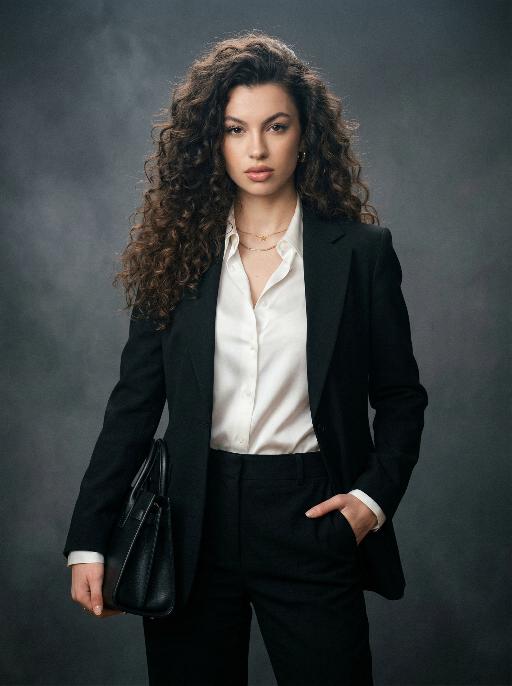
Extreme close-up portrait,Head and shoulders close-up portrait (shot precisely to the chest): Shot by professional fashion editors and photographers, with an upscale and luxurious style. The person in the uploaded picture (with their facial features, gender, hairstyle and age remaining unchanged), has a refined makeup, elegant and generous accessories, is smiling naturally, wearing a well-tailored dark black luxurious suit (a fashionable and avant-garde professional workwear style), a pure white silk shirt, one hand in the pocket, with a confident and sharp expression, a dignified and powerful posture. This photo is a product of the Japanese high-end photography style, using soft diffused film-like lighting, delicate contour lighting, transparent and hazy dark gray studio background, low-key and exquisite color palette, ultra-fine skin texture (using Japanese-style clear photo editing processing), clear and prominent facial features and suit fabric, 8K ultra-high-definition quality, professional fashion photography, elegant and powerful aura, simple high-end aesthetics, subtle 35mm film grain.

Fire & Dance AI effects generated image

Fire & Dance

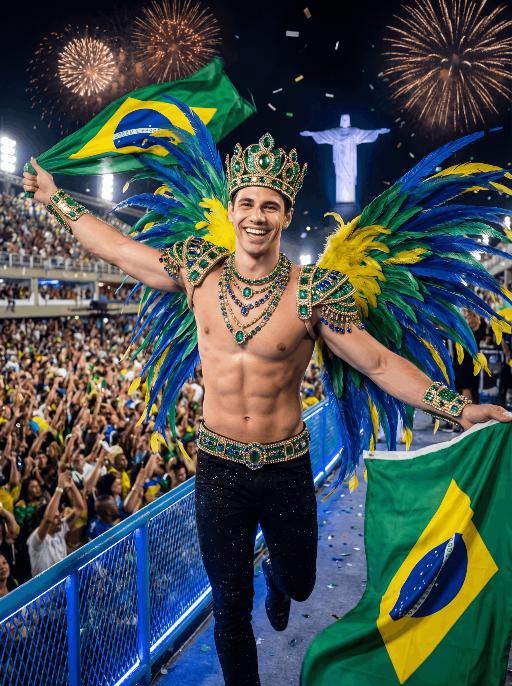
Use the exact same facial features, gender, and age as the character in the uploaded image. Maintain his original identity and natural skin tone. must be clean-shaven (no beard, no mustache, smooth jawline). Preserve a youthful, handsome, and charismatic appearance. A young, muscular Brazilian samba performer at Rio Carnival, running toward the camera with arms wide open in celebration, smiling confidently with bright, expressive eyes. His face is clean-shaven, smooth, and youthful, highlighting strong cheekbones and a defined jawline. holds a large Brazilian flag in one hand, waving it proudly. wears an extravagant Carnival costume: a jeweled green-and-gold crown, elaborate emerald, gold, and sapphire beaded shoulder armor, layered gemstone necklaces, matching ornate wrist cuffs, and a wide decorated belt with intricate embroidery. Large blue, green, and yellow feathered wings extend dramatically from his back. is shirtless, revealing an athletic, well-defined physique with natural skin texture. wears fitted black pants decorated with subtle glitter details. Setting: the Sambadrome at night, filled with a massive cheering crowd. Fireworks explode in the dark sky, casting warm golden and orange highlights across the scene. Christ the Redeemer glows softly in the distant skyline. Confetti fills the air. A blue LED-lit railing in the foreground adds modern contrast lighting. Atmosphere: electrifying, triumphant, patriotic, vibrant, high-energy festival mood. Style: ultra-high-resolution cinematic photography, dramatic contrast lighting, strong rim light outlining his body and feathers, sharp focus on subject, shallow depth of field, 85mm lens, f/1.8, HDR, rich saturated colors, detailed natural skin texture, epic magazine-cover composition.

Fashion Art AI effects generated image

Fashion Art

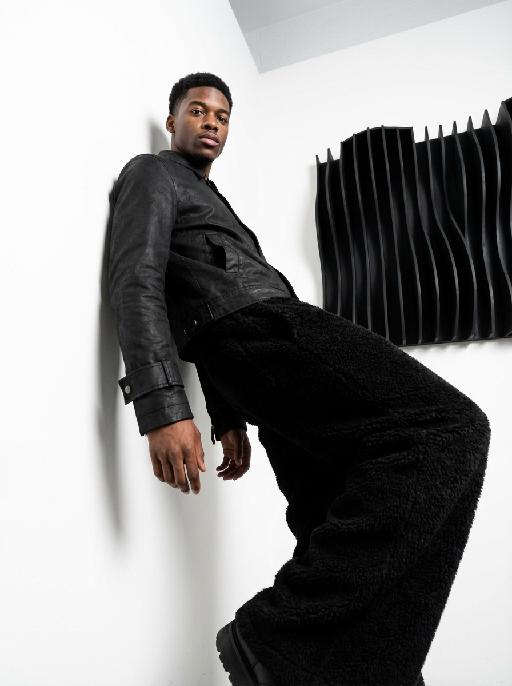
This is a set of professional minimalist style portrait works shot from a low angle. Using a 35mm wide-angle lens, a unique strong perspective distortion effect is presented. This work was taken with a Sony A7R V camera. The uploaded images show the image of the person (with facial features, age and gender unchanged), with neat short hair, matte makeup, highlighting a hard and angular outline, a cold and confident expression, and calm and avant-garde gaze directly at the camera. The body leans against a white matte wall, the right leg is bent and raised, the left arm is placed on the wall, and the right hand is naturally hanging down. Wearing a black worn-out high-end custom leather jacket (with detachable cuffs), a black inner layer, and loose and fluffy black wide-leg pants. The studio uses high-contrast hard light for illumination, with the main light forming a strong contrast line of light and dark in the front, deep shadows, and clear contours. The background is a white matte wall and some black three-dimensional abstract wave-shaped art installations, presenting a strong contrast in visual effect, high contrast, clear texture, and a fashionable and avant-garde photography art style, which can be regarded as a heavyweight work in the fashion world.

Trendy Stickers AI effects generated image

Trendy Stickers

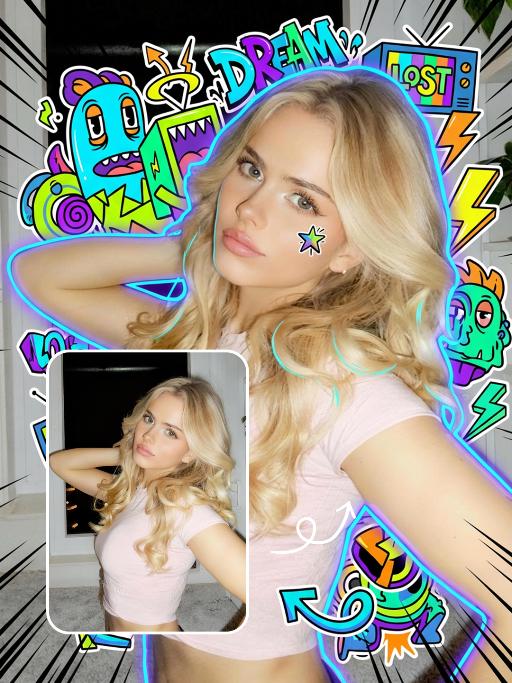
先将上传的图片扩图成3:4的2k超轻尺寸,然后在图片上加入创意涂鸦内容:不要使用固定元素,而是生成与您所识别的视觉主题相匹配的插画元素。如果是酷炫/前卫风格:可以使用箭头、螺栓、涂鸦标签、失真形状、广播盒或抽象的街头艺术怪兽。如果是可爱/甜蜜风格:可以使用独特的角色、心形、星星、糖果、闪光效果和圆形的有机形状。如果选择“虚幻”风格:运用流畅的线条、花瓣、天体以及神奇的漩涡元素。加入的元素风格:平面二维矢量图,粗犷的轮廓,类似贴纸的美感。鲜艳的色彩与写实照片形成对比或相得益彰。 画面的四个边角加入少量的短小的随机黑色动感的漫画式速度线条;人物的周围加上赛博的霓虹发光光效,人物的面部加入一个小涂鸦元素,人物的皮肤轻微磨皮,皮肤自然美颜效果,面部妆容改成欧美流行风格的自然写实的潮流的妆容;写实的人物与写实的场景风格保持不变。

Ramadan Glow

Maintain the exact same facial features, gender, and age as the person in the uploaded image. A young Muslim people wearing a deep navy blue abaya with intricate silver floral embroidery along the front placket and wide cuffs, paired with a soft beige headscarf draped elegantly over her shoulders. She stands gently, holding a glowing ornate golden brass lantern with delicate filigree patterns in both hands, smiling softly at the camera. Background: elegant indoor space with polished white marble walls and floor, hanging vintage Arabic lanterns (fanous) with warm amber light, suspended star-shaped fairy lights, and large illuminated golden marquee letters spelling "RAMADAN KAREEM" (text kept as decorative element). Floor scattered with warm white fairy lights, creating a cozy festive glow. High contrast dramatic chiaroscuro lighting, deep soft shadows on one side of the face, warm golden highlights on the other side, strong light-dark contrast to define facial contours, visible golden sunbeams (Tyndall effect) streaming through the air, catching dust particles and illuminating the lantern glow. Cinematic warm tone, photorealistic portrait, 8K, ultra-detailed textures, luxurious and serene Ramadan atmosphere.

Load more

Next-Gen Multi-Model AI Video Architecture

Vivago AI isn't just one engine—it’s a unified hub for the world’s most advanced video AI. Whether you need cinematic realism or high-speed social content, we provide the right model for your creative vision.

Free Generate


Beauty and Dolphins


Vacation Time


Stellar Tear


Fish Tank Supervisor

Cinematic Quality & Precision Control

Enables 4K resolution with multi-lens motion control, generating delicate scene via text prompts for customized cinematography.​

TRY NOW

Dynamic AV Sync

Auto-generates original audio to avoid copyright issues. Build 3D immersive environments through layered sound design automatically.

TRY NOW

OpenAI Sora 2

​Advanced visual storytelling with unparalleled physics and consistency.

TRY NOW

Kling v2.6 Pro

Industry-leading cinematic image animation and motion control.

TRY NOW

Google Veo 3 & 3.1

Ultra-fast generation with enhanced realism for creative workflows.

TRY NOW

Vivago AI 2.0

Our proprietary model optimized for efficiency, speed, and cost-effective generation.

TRY NOW

Users' Voice

We listen carefully to the opinions of every user.
Free Generate
Contact Us
I tried the Lip Sync feature inside Vivago.ai’s AI Video Generator for my educational podcast, and the results were stunning! The avatar's lip movements perfectly matched my audio recording, creating a professional AI-generated video without complex editing. Compared with tools like OpenAI Sora 2 and Google Veo 3.1, Vivago Image-to-Video delivers fast, studio-quality results online. It saved me hours of post-production work.
ElenaM (Spain)
Vivago’s Image-to-Video AI transformed my marketing workflow. I uploaded a product image and described the launch scene in text, and it generated a 10-second cinematic AI video with background music and dynamic visuals. The output quality rivals Kling v2.6 Pro and Google Veo 3 Fast. It’s now my go-to AI video generator for social media ads and product campaigns.
KenjiT (Japan)
As a digital artist, I use Vivago.ai 2.0 daily for Image-to-Image and AI Image-to-Video creation. The e-book covers and animated visuals I generate for clients look cinematic and professional. Unlike many standalone AI tools, Vivago integrates multiple leading models into one platform, making it easier to create copyright-safe AI images and videos for publishing.
ChenL (China)
I tried the Lip Sync feature inside Vivago.ai’s AI Video Generator for my educational podcast, and the results were stunning! The avatar's lip movements perfectly matched my audio recording, creating a professional AI-generated video without complex editing. Compared with tools like OpenAI Sora 2 and Google Veo 3.1, Vivago Image-to-Video delivers fast, studio-quality results online. It saved me hours of post-production work.
ElenaM (Spain)
Vivago’s Image-to-Video AI transformed my marketing workflow. I uploaded a product image and described the launch scene in text, and it generated a 10-second cinematic AI video with background music and dynamic visuals. The output quality rivals Kling v2.6 Pro and Google Veo 3 Fast. It’s now my go-to AI video generator for social media ads and product campaigns.
KenjiT (Japan)
As a digital artist, I use Vivago.ai 2.0 daily for Image-to-Image and AI Image-to-Video creation. The e-book covers and animated visuals I generate for clients look cinematic and professional. Unlike many standalone AI tools, Vivago integrates multiple leading models into one platform, making it easier to create copyright-safe AI images and videos for publishing.
ChenL (China)
I absolutely love Vivago’s AI Image-to-Video Generator. As a travel blogger, static images often fail to capture real atmosphere, but Vivago helps me turn photos into vivid cinematic AI videos with motion effects. It feels comparable to OpenAI Sora 2 and Google Veo 3.1, but more accessible and faster for creators who need high-quality AI videos online.
LiamK (Australia)
I tried the Lip Sync feature inside Vivago.ai’s AI Video Generator for my educational podcast, and the results were stunning! The avatar's lip movements perfectly matched my audio recording, creating a professional AI-generated video without complex editing. Compared with tools like OpenAI Sora 2 and Google Veo 3.1, Vivago Image-to-Video delivers fast, studio-quality results online. It saved me hours of post-production work.
ElenaM (Spain)
Vivago’s Image-to-Video AI transformed my marketing workflow. I uploaded a product image and described the launch scene in text, and it generated a 10-second cinematic AI video with background music and dynamic visuals. The output quality rivals Kling v2.6 Pro and Google Veo 3 Fast. It’s now my go-to AI video generator for social media ads and product campaigns.
KenjiT (Japan)
As a digital artist, I use Vivago.ai 2.0 daily for Image-to-Image and AI Image-to-Video creation. The e-book covers and animated visuals I generate for clients look cinematic and professional. Unlike many standalone AI tools, Vivago integrates multiple leading models into one platform, making it easier to create copyright-safe AI images and videos for publishing.
ChenL (China)
I absolutely love Vivago’s AI Image-to-Video Generator. As a travel blogger, static images often fail to capture real atmosphere, but Vivago helps me turn photos into vivid cinematic AI videos with motion effects. It feels comparable to OpenAI Sora 2 and Google Veo 3.1, but more accessible and faster for creators who need high-quality AI videos online.
LiamK (Australia)
Using Vivago.ai’s Image-to-Video AI has greatly enhanced my classroom teaching. I transform textbook notes into historical AI videos with cinematic filters and dynamic animations. Compared with tools like Kling v2.6 Pro and Google Veo 3 Fast, Vivago offers faster generation and easier parameter control for educators who need reliable AI video creation.
RajivG (India)
I frequently create AI videos on Vivago and publish them on TikTok and YouTube Shorts. The AI video templates and trending content ideas help me produce viral-ready clips quickly. With Vivago’s integrated models—including advanced video engines similar to OpenAI Sora 2—I can generate anime-style and cinematic social media videos that drive high engagement.
MarieJ (Spain)
What attracts me most about Vivago.ai is not only the powerful AI Video Generator but also the active AIGC creator community. It combines AI Image-to-Video, Text-to-Video, and leading model integrations like Google Veo 3.1 into one creative platform.
TomW (India)
At first, I was hesitant about using AI video tools. But after trying Vivago Image-to-Video, I realized how easy it is to create professional AI-generated videos online. I just upload an image, add a short prompt, and adjust a few settings. The results are cinematic and copyright-safe, which is essential for commercial projects.
HectorC (Mexico)
Using Vivago.ai’s Image-to-Video AI has greatly enhanced my classroom teaching. I transform textbook notes into historical AI videos with cinematic filters and dynamic animations. Compared with tools like Kling v2.6 Pro and Google Veo 3 Fast, Vivago offers faster generation and easier parameter control for educators who need reliable AI video creation.
RajivG (India)
I frequently create AI videos on Vivago and publish them on TikTok and YouTube Shorts. The AI video templates and trending content ideas help me produce viral-ready clips quickly. With Vivago’s integrated models—including advanced video engines similar to OpenAI Sora 2—I can generate anime-style and cinematic social media videos that drive high engagement.
MarieJ (Spain)
What attracts me most about Vivago.ai is not only the powerful AI Video Generator but also the active AIGC creator community. It combines AI Image-to-Video, Text-to-Video, and leading model integrations like Google Veo 3.1 into one creative platform.
TomW (India)
At first, I was hesitant about using AI video tools. But after trying Vivago Image-to-Video, I realized how easy it is to create professional AI-generated videos online. I just upload an image, add a short prompt, and adjust a few settings. The results are cinematic and copyright-safe, which is essential for commercial projects.
HectorC (Mexico)