Miniature Store

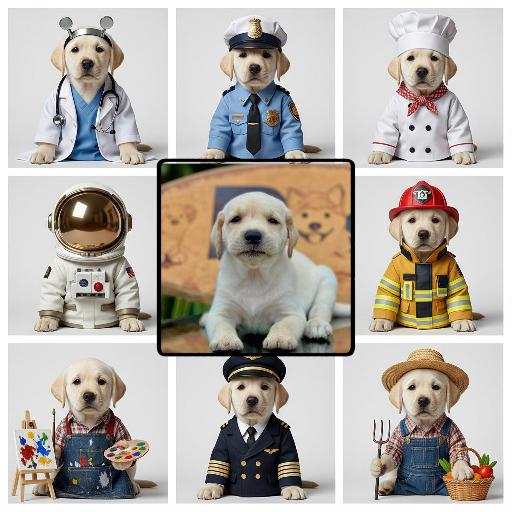
Use the product from the uploaded reference image exactly. Create a whimsical giant takeaway coffee cup transformed into a two-story glass-walled café building, placed on a city sidewalk like a miniature diorama. Warm golden interior lighting with visible tables and people inside; tiny pedestrians and benches around the base; street lamp and potted plants nearby. The cup has a paper lid and straw. Add a clean brand band around the cup in bold letters. Tilt-shift miniature photography look, shallow depth of field, soft bokeh background, warm cinematic color grading, high detail, realistic materials."

Use Template
arrow

More From VIVAGO AI

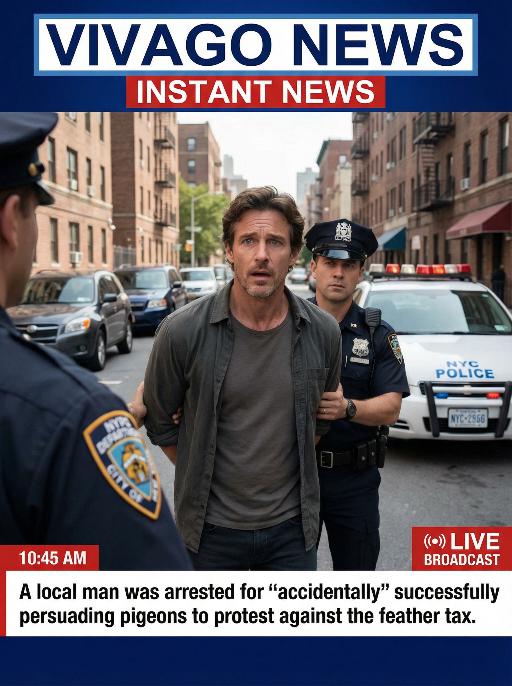
Arrest AI effects generated image

Arrest

Realistic real-time news screenshot: The main subject is the depicted person (with unchanged facial features, gender and age). The expression is shocked and confused. The person was arrested by two New York City police officers on a street in the city. The police tied his hands behind his back. The main figure occupies 80% of the overall picture. The background is a typical New York City street, featuring brick apartment buildings, parked vehicles and a New York City police car. Daylight natural light, over-the-shoulder news camera angle. There is a news caption at the bottom of the picture, stating: A local man was arrested for 'accidentally' successfully persuading pigeons to protest against the feather tax. There is a large title caption at the top of the picture: VIVAGO NEWS INSTANT NEWS. At the corner, there is a timestamp: 10:45 AM. Live broadcast. With a realistic news photography style, rich details, 8K resolution, and a cinematic aesthetic of news clips.

Beast War

Use the user uploaded image as the subject identity source only. Preserve the uploaded subject’s recognizable identity and species. Do not force a specific gender, facial type, hairstyle, clothing design, or species. Transform the uploaded subject into a giant-scale version of itself standing upright in a ruined city battlefield, facing a fixed giant monster in a dramatic standoff. The uploaded subject should keep its original recognizable identity while adapting naturally into an action-ready upright pose with raised limbs or arms. The environment is a destroyed urban battlefield with collapsed skyscrapers, debris, cracked streets, smoke, burning fire, drifting embers, and lava-like fissures in the ground. Dark storm clouds fill the sky, with strong backlight breaking through the clouds, creating epic cinematic contrast. On the opposite side stands a fixed giant monster: massive kaiju body, dark charcoal-black armored skin, rough volcanic reptilian texture, huge muscular limbs, sharp claws, thick legs, large jagged dorsal spines, broad predatory head, glowing eyes, open roaring mouth, sharp fangs, ultra-detailed scales, cracked surfaces, scorched edges, ancient apocalyptic presence. Dramatic rim light from the sky and fiery reflections from below. Photorealistic, ultra detailed, high resolution, 8k, cinematic, sharp focus, volumetric light, realistic texture, epic destruction, intense confrontation energy. no face replacement, no identity change, no extra limbs, no deformed paws, no incorrect anatomy, no blurry monster, no cartoon style, no anime style, no low resolution, no soft details, no duplicated subjects, no oversized head distortion, no chaotic debris, no messy particles, no wrong scale relationship, no unrealistic lighting, no cute monster design

Dance Softly

Strictly lock the subject identity from the reference image: preserve the original species, original identity, original face/facial structure, fur color or skin tone, markings/patterns, body proportions, age impression, gender vibe, eye color, ear/nose/mouth details, hairstyle or fur length and texture, and all unique recognizable traits. The generated result must remain instantly recognizable as the exact same subject from the reference image. Do not change the species, do not replace the subject with another person or another animal, do not lose likeness, do not replace the face. Only transform pose, clothing, accessories, environment, and cinematic presentation. Transform the subject into a full-body standing pose on top of a modern desktop, facing the camera, centered in frame, standing upright on both feet or hind legs, with both arms/front limbs slightly raised in a cute dancing, playful bouncing, or charming interactive pose. The expression should be soft, adorable, natural, and camera-facing. The overall mood should be cute, polished, healing, stylish, lightly anthropomorphic in pose only, while fully preserving the original species and recognizable appearance. Clothing rule must be strict: If the reference subject is a pet, animal, bird, or non-human creature, it must wear a cute full top and small pants/shorts/overalls/full little outfit. The outfit should be adorable, clean, stylish, modest, and properly fitted to the subject’s body. No nudity, no exposed private areas, no bare body presentation, no “only accessories without clothing.” Prefer soft colors such as cream, blush pink, light gray, beige. Keep the outfit simple and refined, and do not hide the subject’s key facial features or recognizable traits. If the reference subject is a human, keep them in a tasteful, cute, clean, stylish full outfit that matches the same adorable desk-setup aesthetic, with no revealing clothing and no identity distortion. Add a pair of soft pink glowing cat-ear over-ear headphones. The headphones should feel premium, dreamy, cute, slightly futuristic, and fashionable, with subtle clean glow accents. Do not let the headphones cover the eyes, face, or key recognizable features. Environment: place the subject in a premium modern computer desk setup scene. The subject stands on the center of the desk, with a large monitor behind them showing a dark or black screen. Add a clean keyboard, elegant small tech accessories, optional crystal or glass decorative objects, and a tidy minimalist desktop environment. The overall atmosphere should be clean, stylish, luxurious, soft, cozy, social-media-friendly, streamer/gaming desk aesthetic. Use a palette of cream white, soft gray, blush pink, and silver, with a gentle feminine tech vibe and minimalist premium styling. Composition: vertical 9:16, full-body visible, no cropping of feet, head, ears, or limbs, subject centered, slightly low-angle or subtly upward eye-level perspective to enhance the cute standing pose. Use shallow depth of field, with the subject sharp and crisp, and the background softly blurred while still readable as a premium desk setup. Lighting and rendering: use soft studio lighting, clear facial illumination, refined body contour light, highly realistic fur/skin/clothing/material textures. The overall style should be ultra detailed, photorealistic, cinematic, high-end commercial quality, cute but realistic. Quality tags: ultra detailed, photorealistic, realistic fur or skin texture, detailed clothing fabric, premium accessories, soft studio lighting, soft shadows, cinematic realism, adorable aesthetic, high-end commercial render, clean luxury desk setup. Style emphasis keywords: same subject, same species, identity preserved, original appearance locked, cute standing pose, playful dance pose, pink glowing cat-ear headphones, pets wearing a cute top and small pants, full outfit, premium computer desk setup, monitor background, minimalist luxury desktop, soft studio lighting, realistic kawaii aesthetic, healing and polished visual style. English Negative Prompt: do not change species, do not replace the subject with another person or another animal, no face replacement, no identity loss, no lost markings, no wrong fur color, no wrong skin tone, no extra limbs, no extra heads, no deformed anatomy, no fused limbs, no asymmetrical eyes, no distorted ears, no face collapse, no blur, no low resolution, no body crop, no messy background, no dirty desk, no horror, no uncanny expression, no excessive cartoon style, no nudity, no exposed private areas, no bare pet body, no accessories-only styling, no overly short clothes, no visible sensitive parts, do not let the headphones block the eyes or key facial features, no watermark, no text, no logo, no overexposure, no underexposure.

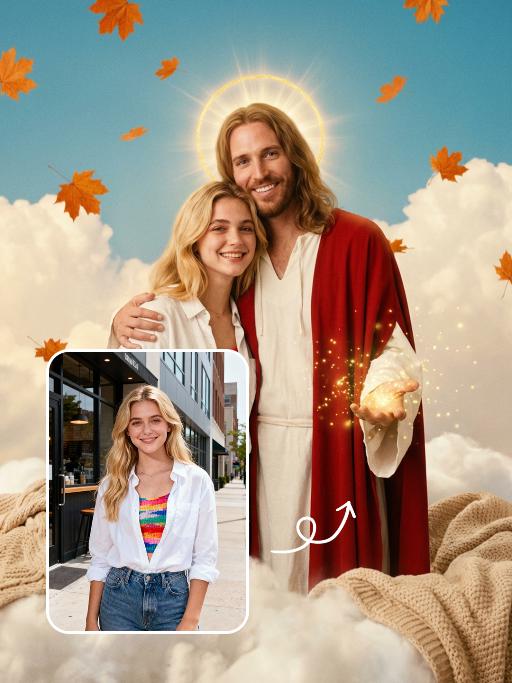
Christmas Baby

Transform the figure in the uploaded image into a Christmas-themed style, standing upright and dressed in a retro Christmas knit sweater with red and green color-blocking (printed with white snowflake and reindeer patterns), a long red tasseled scarf, a cute Christmas hat, a full set of Christmas-themed clothing with Christmas pants, and cute fluffy slouch socks on its feet.Scene: A warm American home with a Christmas setup, featuring exquisite gift boxes placed on snow-dusted ground; the background is Christmas decor in a dominant red tone, with a Christmas wreath hung above adorned with red and gold baubles and white flowers, and Christmas trees on both sides dusted with a light layer of snow and decorated with red and gold baubles.Texture & Style: The frame is ultra-high-definition and delicate (cinematic texture at 8K level), with soft and bright lighting, vivid and festive colors, and clear details such as the sweater’s knit texture and the luster of apples. Shot in the style of high-end editorial fashion photography.

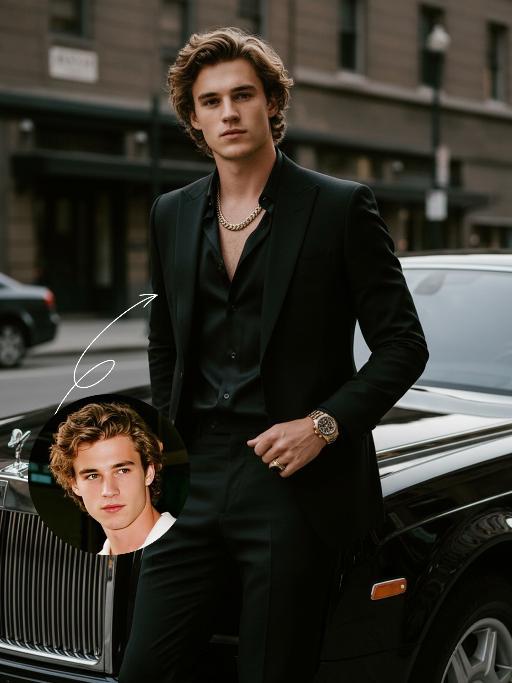
Elegant Gentle AI effects generated image

Elegant Gentle

Use the UPLOADED PORTRAIT for strict identity lock (keep face, hair, skin tone, age). Cinematic portrait of a man with a tall, dashing body, with the style of a mafia boss, standing alone with an aura of confidence and authority. He is beside a luxurious black Rolls-Royce car on a city street, a relaxed pose leaning against the car showing the Rolls-Royce logo with a classy style. All-black outfit: a neat suit, an open-collar black shirt with a luxurious necklace, formal pants, leather shoes, with a luxurious ring and a luxurious watch. His expression is serious and charismatic, radiating energy like a mafia boss. The atmosphere of the photo uses low saturation color grading with a dominance of pitch black and faded gray tones, giving a dark, elegant, and classy feel ala mafia movies. The background of the city building is blurred so that the main focus remains on the man and his car. Hyper-realistic, ultra-detailed, professional photography style.

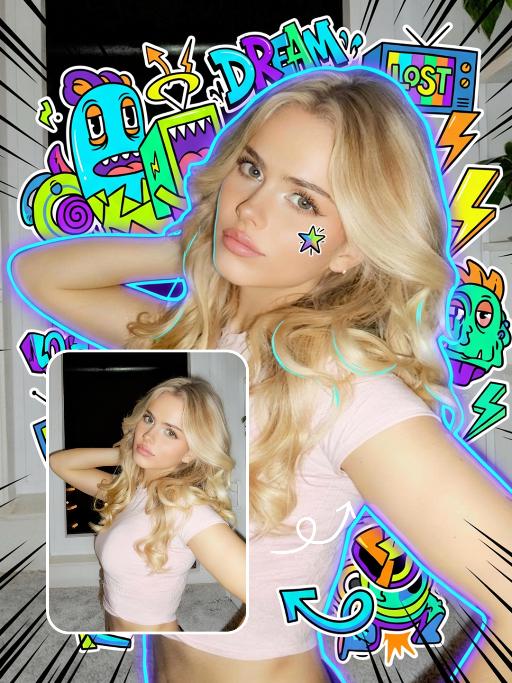
Trendy Stickers AI effects generated image

Trendy Stickers

先将上传的图片扩图成3:4的2k超轻尺寸,然后在图片上加入创意涂鸦内容:不要使用固定元素,而是生成与您所识别的视觉主题相匹配的插画元素。如果是酷炫/前卫风格:可以使用箭头、螺栓、涂鸦标签、失真形状、广播盒或抽象的街头艺术怪兽。如果是可爱/甜蜜风格:可以使用独特的角色、心形、星星、糖果、闪光效果和圆形的有机形状。如果选择“虚幻”风格:运用流畅的线条、花瓣、天体以及神奇的漩涡元素。加入的元素风格:平面二维矢量图,粗犷的轮廓,类似贴纸的美感。鲜艳的色彩与写实照片形成对比或相得益彰。 画面的四个边角加入少量的短小的随机黑色动感的漫画式速度线条;人物的周围加上赛博的霓虹发光光效,人物的面部加入一个小涂鸦元素,人物的皮肤轻微磨皮,皮肤自然美颜效果,面部妆容改成欧美流行风格的自然写实的潮流的妆容;写实的人物与写实的场景风格保持不变。

Cross Earth

"Generate based on the user-uploaded reference image while preserving the subject’s core identity and recognizable features. This includes but is not limited to: subject category, facial structure, proportions, eye characteristics, fur/skin/material texture, color distribution, body traits, age impression, temperament, clothing traits, accessories, and overall recognizability. Whether the uploaded subject is a cat, dog, man, woman, baby, animal, toy, doll, or any other kind of subject, it must remain the same subject. Do not replace its identity, do not significantly alter the face, and do not remove its most recognizable features. Transform the subject into a travel souvenir portrait taken at Christ the Redeemer in Rio de Janeiro, Brazil, on top of Corcovado Mountain. The location must be explicit and fixed: the massive Christ the Redeemer statue must appear clearly in the background, with its stone structure and outstretched arms visible behind the subject, positioned slightly left-behind or directly behind at a higher elevation. The surrounding view must show the elevated panoramic landscape of Rio de Janeiro, including the city below, the bay, water, islands, mountain forms, coastline, and the iconic mountain-and-sea urban geography. The setting must clearly look like the observation area on Corcovado Mountain, and must not be changed into any other city, statue, monument, or mountain viewpoint. The subject should stand in the foreground near the camera in a sightseeing photo pose. If the subject is human or humanoid, use a semi-profile standing pose: the body is turned slightly away or sideways, while the head turns back toward the camera with a smile, creating a natural travel-photo feeling. If the subject is an animal, pet, or non-human figure, adapt it into a cute upright or semi-upright display pose suitable for the same setting, with the body angled slightly sideways and the head turned toward the camera, creating a “looking back at the camera” travel-photo effect. The overall pose should feel natural, relaxed, friendly, and photogenic, like a tourist landmark portrait. The subject’s outfit should remain as close as possible to the original uploaded image. If minimal scene adaptation is needed, only make very slight natural adjustments, but do not change the clothing type, main colors, mood, or recognizability. Do not force a costume change, do not add excessive accessories, and do not break the subject’s identity. The background must be strongly locked to the Christ the Redeemer viewpoint: the large Christ the Redeemer statue is clearly visible behind the subject; below is the panoramic cityscape of Rio de Janeiro with dense urban buildings; farther away there is a visible bay, water, islands, hills, and iconic coastal geography; the perspective is clearly elevated and scenic, like a famous tourist lookout; the sky is clear blue with warm sunlight; the image should feel like real travel photography, not studio photography or a generic artificial backdrop.** Composition should be vertical, medium-to-half-body, three-quarter-body, or full-body framing. The subject should preferably stand on the right or front-right side of the frame so the Christ the Redeemer statue can remain clearly visible in the background for a classic tourist-photo composition. The camera is eye-level or slightly low. The subject must be sharp, and the landmark must remain clearly recognizable. Depth of field should be natural, without overly blurring the statue or city skyline. Lighting should be natural daylight, preferably warm afternoon or golden-hour sunlight. Skin/fur/material rendering should be realistic, with a clear, bright, airy image. Colors should be vivid but not exaggerated. The overall style should be high-quality realistic travel photography with a subtle polished commercial feel. Key constraints: The uploaded subject’s core identity and recognizability must remain intact; do not replace or redesign the subject; The location must be fixed at Christ the Redeemer, Rio de Janeiro, Brazil, on Corcovado Mountain; The background must clearly include the Christ the Redeemer statue and the panoramic cityscape of Rio; The subject must appear in a natural travel souvenir / landmark photo pose; Must work for all species and subject types; The final result should resemble a real travel photograph."

Dance With her

Model’s original facial features, facial contour and hairstyle are 100% preserved in their entirety, extremely smooth cinematic visual transition, natural narrative pacing, 4K ultra-high resolution, photorealistic skin & fabric textures, cinematic color grading, warm soft natural light, highly saturated vivid colors, exquisite lifelike details, strong cinematic texture, seamless scene fusion, smooth lens-like visual connection, no abrupt frame or element changes, **fixed medium close-up perspective throughout, the camera follows the characters' dancing movements smoothly without pulling back or zooming out. The picture presents a natural lens narrative with a fixed medium close-up: the uploaded character is in the core visual area, initially wearing original daily wear with a relaxed posture and slight face-to-camera, facial features in sharp focus, warm soft light bathing the whole body; the background fades and blends naturally from a simple base into a traditional Indonesian interior, with Persian-patterned carpets and painted carved pillars emerging gradually to lay a seamless spatial foundation, the scene expansion is gentle and fits the lens follow rhythm without any perspective pullback. The traditional Indonesian interior scene is fully presented with rich layers—Persian-patterned carpets covering the ground, painted carved stone pillars standing tall, warm wall sconces emitting soft light, the entire space is bright with distinct light and shadow levels. A gorgeous and attractive young Indonesian woman enters the frame in a smooth, natural way matching the scene fusion rhythm; she has long thick black double braids, a bright and seductive smile, and is barefoot, wearing a luxurious traditional Indonesian kebaya (color-blocked embroidered sequined corset with turquoise tulle lantern skirt, decorated with pearl tassels and gold-thread embroidery) and ornate Indonesian ethnic gold jewelry (necklace, earrings, bangles). The uploaded character stands up naturally and gracefully in the visual transition, the two hold hands tightly in the center of the Indonesian interior space, spinning and dancing joyfully with light, vivid and smooth movements; the camera follows the two characters' spinning and dancing trajectory in a steady medium close-up, with the lens moving naturally and slightly to fit their body movements, always keeping both characters in the core of the frame without pulling back or changing the perspective**. Warm wall sconce light blends with soft natural light, perfectly highlighting the intricate embroidery details of the two's costumes, the bright luster of gold jewelry and the joyful, vivid facial expressions of both characters, highly saturated colors amplify the gorgeous and lively atmosphere of the scene, all character and costume details are clear and realistic due to the fixed medium close-up follow shot; the whole picture realizes seamless connection of scene fading, character entry and dance movement, the lens follow is smooth and natural, and the narrative layering is rich without disorder.

Load more

Next-Gen Multi-Model AI Video Architecture

Vivago AI isn't just one engine—it’s a unified hub for the world’s most advanced video AI. Whether you need cinematic realism or high-speed social content, we provide the right model for your creative vision.

Free Generate


Beauty and Dolphins

Vacation Time


Stellar Tear


Fish Tank Supervisor

Cinematic Quality & Precision Control

Enables 4K resolution with multi-lens motion control, generating delicate scene via text prompts for customized cinematography.​

TRY NOW

Dynamic AV Sync

Auto-generates original audio to avoid copyright issues. Build 3D immersive environments through layered sound design automatically.

TRY NOW

OpenAI Sora 2

​Advanced visual storytelling with unparalleled physics and consistency.

TRY NOW

Kling v2.6 Pro

Industry-leading cinematic image animation and motion control.

TRY NOW

Google Veo 3 & 3.1

Ultra-fast generation with enhanced realism for creative workflows.

TRY NOW

Vivago AI 2.0

Our proprietary model optimized for efficiency, speed, and cost-effective generation.

TRY NOW

Users' Voice

We listen carefully to the opinions of every user.
Free Generate
Contact Us
I tried the Lip Sync feature inside Vivago.ai’s AI Video Generator for my educational podcast, and the results were stunning! The avatar's lip movements perfectly matched my audio recording, creating a professional AI-generated video without complex editing. Compared with tools like OpenAI Sora 2 and Google Veo 3.1, Vivago Image-to-Video delivers fast, studio-quality results online. It saved me hours of post-production work.
ElenaM (Spain)
Vivago’s Image-to-Video AI transformed my marketing workflow. I uploaded a product image and described the launch scene in text, and it generated a 10-second cinematic AI video with background music and dynamic visuals. The output quality rivals Kling v2.6 Pro and Google Veo 3 Fast. It’s now my go-to AI video generator for social media ads and product campaigns.
KenjiT (Japan)
As a digital artist, I use Vivago.ai 2.0 daily for Image-to-Image and AI Image-to-Video creation. The e-book covers and animated visuals I generate for clients look cinematic and professional. Unlike many standalone AI tools, Vivago integrates multiple leading models into one platform, making it easier to create copyright-safe AI images and videos for publishing.
ChenL (China)
I tried the Lip Sync feature inside Vivago.ai’s AI Video Generator for my educational podcast, and the results were stunning! The avatar's lip movements perfectly matched my audio recording, creating a professional AI-generated video without complex editing. Compared with tools like OpenAI Sora 2 and Google Veo 3.1, Vivago Image-to-Video delivers fast, studio-quality results online. It saved me hours of post-production work.
ElenaM (Spain)
Vivago’s Image-to-Video AI transformed my marketing workflow. I uploaded a product image and described the launch scene in text, and it generated a 10-second cinematic AI video with background music and dynamic visuals. The output quality rivals Kling v2.6 Pro and Google Veo 3 Fast. It’s now my go-to AI video generator for social media ads and product campaigns.
KenjiT (Japan)
As a digital artist, I use Vivago.ai 2.0 daily for Image-to-Image and AI Image-to-Video creation. The e-book covers and animated visuals I generate for clients look cinematic and professional. Unlike many standalone AI tools, Vivago integrates multiple leading models into one platform, making it easier to create copyright-safe AI images and videos for publishing.
ChenL (China)
I absolutely love Vivago’s AI Image-to-Video Generator. As a travel blogger, static images often fail to capture real atmosphere, but Vivago helps me turn photos into vivid cinematic AI videos with motion effects. It feels comparable to OpenAI Sora 2 and Google Veo 3.1, but more accessible and faster for creators who need high-quality AI videos online.
LiamK (Australia)
I tried the Lip Sync feature inside Vivago.ai’s AI Video Generator for my educational podcast, and the results were stunning! The avatar's lip movements perfectly matched my audio recording, creating a professional AI-generated video without complex editing. Compared with tools like OpenAI Sora 2 and Google Veo 3.1, Vivago Image-to-Video delivers fast, studio-quality results online. It saved me hours of post-production work.
ElenaM (Spain)
Vivago’s Image-to-Video AI transformed my marketing workflow. I uploaded a product image and described the launch scene in text, and it generated a 10-second cinematic AI video with background music and dynamic visuals. The output quality rivals Kling v2.6 Pro and Google Veo 3 Fast. It’s now my go-to AI video generator for social media ads and product campaigns.
KenjiT (Japan)
As a digital artist, I use Vivago.ai 2.0 daily for Image-to-Image and AI Image-to-Video creation. The e-book covers and animated visuals I generate for clients look cinematic and professional. Unlike many standalone AI tools, Vivago integrates multiple leading models into one platform, making it easier to create copyright-safe AI images and videos for publishing.
ChenL (China)
I absolutely love Vivago’s AI Image-to-Video Generator. As a travel blogger, static images often fail to capture real atmosphere, but Vivago helps me turn photos into vivid cinematic AI videos with motion effects. It feels comparable to OpenAI Sora 2 and Google Veo 3.1, but more accessible and faster for creators who need high-quality AI videos online.
LiamK (Australia)
Using Vivago.ai’s Image-to-Video AI has greatly enhanced my classroom teaching. I transform textbook notes into historical AI videos with cinematic filters and dynamic animations. Compared with tools like Kling v2.6 Pro and Google Veo 3 Fast, Vivago offers faster generation and easier parameter control for educators who need reliable AI video creation.
RajivG (India)
I frequently create AI videos on Vivago and publish them on TikTok and YouTube Shorts. The AI video templates and trending content ideas help me produce viral-ready clips quickly. With Vivago’s integrated models—including advanced video engines similar to OpenAI Sora 2—I can generate anime-style and cinematic social media videos that drive high engagement.
MarieJ (Spain)
What attracts me most about Vivago.ai is not only the powerful AI Video Generator but also the active AIGC creator community. It combines AI Image-to-Video, Text-to-Video, and leading model integrations like Google Veo 3.1 into one creative platform.
TomW (India)
At first, I was hesitant about using AI video tools. But after trying Vivago Image-to-Video, I realized how easy it is to create professional AI-generated videos online. I just upload an image, add a short prompt, and adjust a few settings. The results are cinematic and copyright-safe, which is essential for commercial projects.
HectorC (Mexico)
Using Vivago.ai’s Image-to-Video AI has greatly enhanced my classroom teaching. I transform textbook notes into historical AI videos with cinematic filters and dynamic animations. Compared with tools like Kling v2.6 Pro and Google Veo 3 Fast, Vivago offers faster generation and easier parameter control for educators who need reliable AI video creation.
RajivG (India)
I frequently create AI videos on Vivago and publish them on TikTok and YouTube Shorts. The AI video templates and trending content ideas help me produce viral-ready clips quickly. With Vivago’s integrated models—including advanced video engines similar to OpenAI Sora 2—I can generate anime-style and cinematic social media videos that drive high engagement.
MarieJ (Spain)
What attracts me most about Vivago.ai is not only the powerful AI Video Generator but also the active AIGC creator community. It combines AI Image-to-Video, Text-to-Video, and leading model integrations like Google Veo 3.1 into one creative platform.
TomW (India)
At first, I was hesitant about using AI video tools. But after trying Vivago Image-to-Video, I realized how easy it is to create professional AI-generated videos online. I just upload an image, add a short prompt, and adjust a few settings. The results are cinematic and copyright-safe, which is essential for commercial projects.
HectorC (Mexico)