Elevator Turkey

Create a funny AI-generated group photo: a hip-hop styled person with gold jewelry shares an elevator with a Disney-style, personified Thanksgiving turkey wearing sunglasses. Captured with an ultra-wide-angle lens from a bird's-eye view. Perfect for unique AI visual effects and creative holiday content generation.

Use Template
arrow

FAQs

What are Effect Templates?

Effect Templates are predefined AI workflows that automatically transform static images into specific visual styles or animated formats, delivering consistent, high-quality results without manual adjustments.

How do I apply Effect Templates?

Select your preferred template > Upload an image > Generate. No text prompts required - templates handle all style parameters.

Where can I find more templates?

Explore 1000+ curated templates in our Explore Hub: https://vivago.ai/studio. New templates added weekly across categories.

What's the pricing?

Daily login grants 100 free credits. Exhausted credits? Choose: 1) Subscribe a membership plan, 2) Get a credit pack. Details: https://vivago.ai/subscribe

More From VIVAGO AI

Goofy AI effects generated image

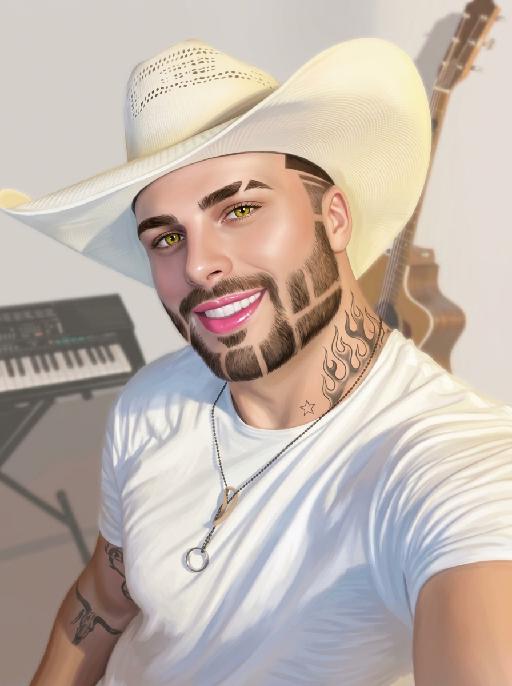
Goofy

The person's skin has a porcelain-like smoothness with a photo-retouching effect. The posture and facial features of the person in the uploaded picture remain unchanged (the posture is consistent, the hairstyle and clothing have not been modified, the hairstyle and clothing remain the same, and the picture background has not been altered). However, the triangular incision at the hairline + side straight shaving lines, sharp eyebrows + obvious broken eyebrows (with a mid-section cut-off gap) design, and also neat gaps with cut segments on the beard; the overall style of the entire picture has transformed into a portrait style that combines 60% digital painting style and 40% real photography style. The person's skin is as smooth and flawless as porcelain, having undergone deep beauty treatment. The eyes are gold-green contact lenses, the lips are painted with shiny pink lipstick, there is a tribal flame tattoo on the neck, and a small star tattoo on the collarbone. The background is the same as the original picture, with a bright filter added, presenting a low saturation and blurry effect, 8K resolution, and beautiful Instagram filter effect. The lines are simple and smooth, with a low overall contrast, a plain style but with bright and rich colors.

Hold Deceased

The two uploaded characters (with their facial features, age and gender remaining unchanged), the first uploaded image shows a person with a warm glowing edge effect), the two stand naturally side by side; the scene is an American country-style living room, with a burning stone fireplace, wooden furniture, vintage paintings and large windows with white curtains as the background. The entire scene is enveloped by soft and warm yellow light, creating a peaceful, warm and slightly nostalgic atmosphere. The camera is in medium shot and medium close-up, within the focal range, and the character proportions follow the laws of physical movement. The film has high-definition quality, hyper-realistic, all characters face forward, stand closely side by side, with realistic film texture. The shallow depth of field highlights the characters, the warm-toned soft light, fine skin and fabric textures, and the composition is natural and realistic.

Lighting AI effects generated image

Lighting

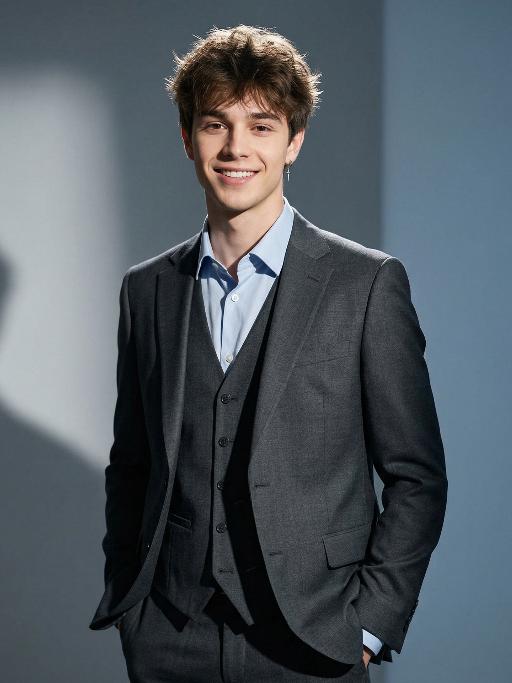
Extreme close-up portrait,Head and shoulders close-up portrait (shot precisely to the chest): Extreme close-up portrait: The person in the uploaded picture (with facial features, gender, hairstyle and age remaining unchanged) has clear and detailed facial features, natural and soft side lighting, 8K ultra-high-definition quality, professional portrait photography, rich details, without excessive skin retouching. Professional fashion editors and photographers have an elegant and luxurious style. Wearing a well-tailored dark gray three-piece suit, paired with a light blue collar shirt, wearing simple silver earrings, with hands in the pockets, standing in a simple pure gray and blue solid background. Lighting: High-end professional studio lighting, projecting strong hard light from the side, forming clear and distinct shadow layers on the walls, soft fill light to retain details in the dark areas, bright edge light/ hair light to outline the figure and separate it from the background, using high-contrast film-level lighting, designed by a top fashion photographer with an award-winning lighting scheme, 8K ultra-high resolution, clear focus, fashionable and avant-garde photography art, top photography style, professional color grading, commercial advertising aesthetics, realistic and true, ultra-fine.

Blue Suit AI effects generated image

Blue Suit

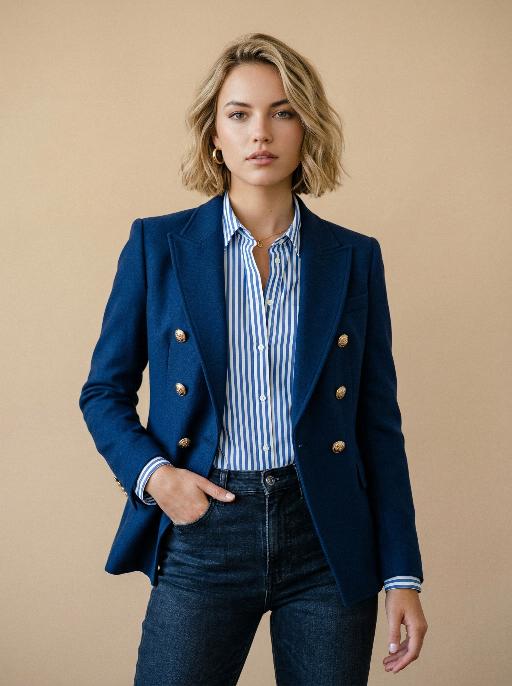
Extreme close-up portrait,Head and shoulders close-up portrait (shot precisely to the chest): Professional fashion editing and photography, with an upscale and luxurious style. In the uploaded photos, the subjects (with their facial features, gender, hairstyle and age remaining unchanged) are wearing well-tailored dark blue double-breasted suits, paired with golden metal buttons. The subjects' makeup is elegant and refined, complemented by blue and white striped shirts and dark high-waisted jeans. The subjects stand in a confident half-body pose, with one hand behind their backs, looking directly at the camera, smiling with a confident expression. The background is a pure and serene warm-toned beige (with the soft shadows of top-notch studio lighting), creating a clean and tidy visual effect, without any chaotic visual focus. The photography uses top-notch studio lighting, with the soft main light shaping the facial contours, while combining subtle backlighting to outline the hair and shoulder contours, avoiding strong shadows. The shooting uses a Sony A7R IV camera, paired with an 85mm f/1.4 dedicated lens. The photo has a shallow depth of field effect, highlighting the fabric textures (suits texture, shirt stripes, denim weaving) and skin details. This photo has 8K ultra-high resolution, with extremely high fidelity, using professional color grading technology, featuring subtle film grain effects, with a cinematic texture, showcasing the aesthetic concepts of photography pioneers, and is a work created by a top photographer, in line with the cover style of Vogue magazine, and without watermarks or text.

Bali style AI effects generated image

Bali style

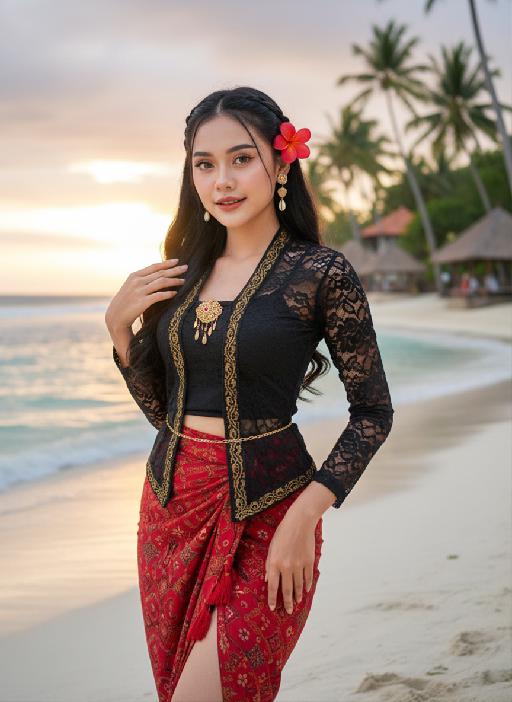
Strictly lock the facial features of the uploaded portrait (preserve facial contours, native Indonesian skin tone, hairstyle and age completely)Strictly restore the classic Indonesian facial features and warm native medium wheat skin tone, young stunning Indonesian beauty in her 20s, three-dimensional delicate features, bright charming eyes, glossy honey lips with a slight smile, healthy glowing skin with natural tropical luster; half bohemian braided long black wavy hair, a bright red plumeria (Indonesian national flower) pinned behind the ear, a few loose hair strands framing the face; wearing a sexy improved Indonesian traditional costume - slim cropped black lace kebaya top with gold batik trim, high-waisted split-side red batik sarong skirt with tassel details, wrapping the graceful curvy figure, accessorized with delicate Balinese gold shell drop earrings, a thin gold waist chain, and hand-woven Indonesian beaded anklets; standing on the white sand beach of Bali Indonesia, with turquoise rolling ocean waves, swaying tall coconut trees, and a few Balinese traditional thatched pavilions in the background, soft tropical sunset golden glow spreading over the sea, the figure is in the center of the frame with a large proportion, close-up shot from the thigh up, confident and charming posture with one hand lightly lifting the sarong skirt and the other hand touching the plumeria behind the ear; dappled coconut leaf shadows falling on the body, soft backlight outlining the figure's delicate silhouette, warm orange-pink tropical sunset light, rich saturated colors with Indonesian tropical style; 3:4 vertical composition, ultra-realistic photography style, 8K high definition, hyper-detailed fabric texture (lace/ batik/ sarong), clear water and sand details, cinematic soft focus, sexy tropical allure, bold and hot temperament, strong authentic Indonesian exotic charm, classic Bali beach romantic atmosphere

Load more

Next-Gen Multi-Model AI Video Architecture

Vivago AI isn't just one engine—it’s a unified hub for the world’s most advanced video AI. Whether you need cinematic realism or high-speed social content, we provide the right model for your creative vision.

Free Generate



Beauty and Dolphins

Vacation Time


Stellar Tear


Fish Tank Supervisor

Cinematic Quality & Precision Control

Enables 4K resolution with multi-lens motion control, generating delicate scene via text prompts for customized cinematography.​

TRY NOW

Dynamic AV Sync

Auto-generates original audio to avoid copyright issues. Build 3D immersive environments through layered sound design automatically.

TRY NOW

OpenAI Sora 2

​Advanced visual storytelling with unparalleled physics and consistency.

TRY NOW

Kling v2.6 Pro

Industry-leading cinematic image animation and motion control.

TRY NOW

Google Veo 3 & 3.1

Ultra-fast generation with enhanced realism for creative workflows.

TRY NOW

Vivago AI 2.0

Our proprietary model optimized for efficiency, speed, and cost-effective generation.

TRY NOW

Users' Voice

We listen carefully to the opinions of every user.
Free Generate
Contact Us
I tried the Lip Sync feature inside Vivago.ai’s AI Video Generator for my educational podcast, and the results were stunning! The avatar's lip movements perfectly matched my audio recording, creating a professional AI-generated video without complex editing. Compared with tools like OpenAI Sora 2 and Google Veo 3.1, Vivago Image-to-Video delivers fast, studio-quality results online. It saved me hours of post-production work.
ElenaM (Spain)
Vivago’s Image-to-Video AI transformed my marketing workflow. I uploaded a product image and described the launch scene in text, and it generated a 10-second cinematic AI video with background music and dynamic visuals. The output quality rivals Kling v2.6 Pro and Google Veo 3 Fast. It’s now my go-to AI video generator for social media ads and product campaigns.
KenjiT (Japan)
As a digital artist, I use Vivago.ai 2.0 daily for Image-to-Image and AI Image-to-Video creation. The e-book covers and animated visuals I generate for clients look cinematic and professional. Unlike many standalone AI tools, Vivago integrates multiple leading models into one platform, making it easier to create copyright-safe AI images and videos for publishing.
ChenL (China)
I tried the Lip Sync feature inside Vivago.ai’s AI Video Generator for my educational podcast, and the results were stunning! The avatar's lip movements perfectly matched my audio recording, creating a professional AI-generated video without complex editing. Compared with tools like OpenAI Sora 2 and Google Veo 3.1, Vivago Image-to-Video delivers fast, studio-quality results online. It saved me hours of post-production work.
ElenaM (Spain)
Vivago’s Image-to-Video AI transformed my marketing workflow. I uploaded a product image and described the launch scene in text, and it generated a 10-second cinematic AI video with background music and dynamic visuals. The output quality rivals Kling v2.6 Pro and Google Veo 3 Fast. It’s now my go-to AI video generator for social media ads and product campaigns.
KenjiT (Japan)
As a digital artist, I use Vivago.ai 2.0 daily for Image-to-Image and AI Image-to-Video creation. The e-book covers and animated visuals I generate for clients look cinematic and professional. Unlike many standalone AI tools, Vivago integrates multiple leading models into one platform, making it easier to create copyright-safe AI images and videos for publishing.
ChenL (China)
I absolutely love Vivago’s AI Image-to-Video Generator. As a travel blogger, static images often fail to capture real atmosphere, but Vivago helps me turn photos into vivid cinematic AI videos with motion effects. It feels comparable to OpenAI Sora 2 and Google Veo 3.1, but more accessible and faster for creators who need high-quality AI videos online.
LiamK (Australia)
I tried the Lip Sync feature inside Vivago.ai’s AI Video Generator for my educational podcast, and the results were stunning! The avatar's lip movements perfectly matched my audio recording, creating a professional AI-generated video without complex editing. Compared with tools like OpenAI Sora 2 and Google Veo 3.1, Vivago Image-to-Video delivers fast, studio-quality results online. It saved me hours of post-production work.
ElenaM (Spain)
Vivago’s Image-to-Video AI transformed my marketing workflow. I uploaded a product image and described the launch scene in text, and it generated a 10-second cinematic AI video with background music and dynamic visuals. The output quality rivals Kling v2.6 Pro and Google Veo 3 Fast. It’s now my go-to AI video generator for social media ads and product campaigns.
KenjiT (Japan)
As a digital artist, I use Vivago.ai 2.0 daily for Image-to-Image and AI Image-to-Video creation. The e-book covers and animated visuals I generate for clients look cinematic and professional. Unlike many standalone AI tools, Vivago integrates multiple leading models into one platform, making it easier to create copyright-safe AI images and videos for publishing.
ChenL (China)
I absolutely love Vivago’s AI Image-to-Video Generator. As a travel blogger, static images often fail to capture real atmosphere, but Vivago helps me turn photos into vivid cinematic AI videos with motion effects. It feels comparable to OpenAI Sora 2 and Google Veo 3.1, but more accessible and faster for creators who need high-quality AI videos online.
LiamK (Australia)
Using Vivago.ai’s Image-to-Video AI has greatly enhanced my classroom teaching. I transform textbook notes into historical AI videos with cinematic filters and dynamic animations. Compared with tools like Kling v2.6 Pro and Google Veo 3 Fast, Vivago offers faster generation and easier parameter control for educators who need reliable AI video creation.
RajivG (India)
I frequently create AI videos on Vivago and publish them on TikTok and YouTube Shorts. The AI video templates and trending content ideas help me produce viral-ready clips quickly. With Vivago’s integrated models—including advanced video engines similar to OpenAI Sora 2—I can generate anime-style and cinematic social media videos that drive high engagement.
MarieJ (Spain)
What attracts me most about Vivago.ai is not only the powerful AI Video Generator but also the active AIGC creator community. It combines AI Image-to-Video, Text-to-Video, and leading model integrations like Google Veo 3.1 into one creative platform.
TomW (India)
At first, I was hesitant about using AI video tools. But after trying Vivago Image-to-Video, I realized how easy it is to create professional AI-generated videos online. I just upload an image, add a short prompt, and adjust a few settings. The results are cinematic and copyright-safe, which is essential for commercial projects.
HectorC (Mexico)
Using Vivago.ai’s Image-to-Video AI has greatly enhanced my classroom teaching. I transform textbook notes into historical AI videos with cinematic filters and dynamic animations. Compared with tools like Kling v2.6 Pro and Google Veo 3 Fast, Vivago offers faster generation and easier parameter control for educators who need reliable AI video creation.
RajivG (India)
I frequently create AI videos on Vivago and publish them on TikTok and YouTube Shorts. The AI video templates and trending content ideas help me produce viral-ready clips quickly. With Vivago’s integrated models—including advanced video engines similar to OpenAI Sora 2—I can generate anime-style and cinematic social media videos that drive high engagement.
MarieJ (Spain)
What attracts me most about Vivago.ai is not only the powerful AI Video Generator but also the active AIGC creator community. It combines AI Image-to-Video, Text-to-Video, and leading model integrations like Google Veo 3.1 into one creative platform.
TomW (India)
At first, I was hesitant about using AI video tools. But after trying Vivago Image-to-Video, I realized how easy it is to create professional AI-generated videos online. I just upload an image, add a short prompt, and adjust a few settings. The results are cinematic and copyright-safe, which is essential for commercial projects.
HectorC (Mexico)