Fighting Giant

这是一个格斗比赛擂台场景,竞技场馆的明亮射灯;照片级真实感,高清细节,色彩自然,摄像机保持近景搏斗,上传的人物,表情夸张,张大嘴怒吼,赤脚跑步站在格斗擂台左边,擂台的右边是一位很高的肌肉发达、有纹身的格斗选手,两个人表情嚣张怒吼,进行战斗前对峙;上传的人物突然跳起来身体腾空向右旋转一圈,用脚和腿部飞踢暴打格斗选手的头部 ,格斗选手被暴打了3次之后最终失败倒地;上传的人物胜利开心得意得微笑,站在舞台中间欢呼庆祝,周围的观众鼓掌,摄像机焦距推到中近景,展示人物的上半身

Use Template
arrow

More From VIVAGO AI

Girlfriend

In the uploaded picture, that person (with unchanged facial features) is wearing a well-tailored and high-quality black custom suit and a sophisticated watch. Next to her sits a beautiful woman in a flowing deep red strapless dress, wearing exquisite accessories, with the skirt extending all the way to the ground. This couple, filled with romantic atmosphere, is inside a huge deep red inflatable hot air balloon basket (decorated with abundant romantic roses). They bump their glasses together and gaze deeply into each other's eyes. Below is the cityscape of Paris, and on the left, the Eiffel Tower is clearly visible. Surrounding it are floating heart-shaped red hot air balloons. The scene is set at the golden hour of sunset, with the sky presenting a warm orange-yellow color. The soft background light creates a hazy film-like glow, with low color saturation, soft contrast between light and dark, creating a dreamy and luxurious atmosphere, with a high-end wedding photography style, fine texture, soft background blurring effect, and the top of the main hot air balloon has the glowing words "Happy Valentine's Day". It is a movie-like realistic scene, with movie-like effects, wide-angle lens shooting, a震撼 scene, and the light effect of the setting sun's afterglow.

Old Town Walk AI effects generated image

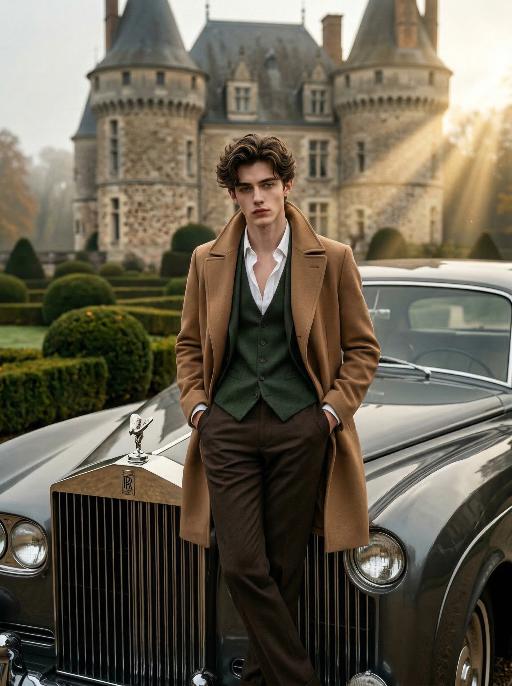
Old Town Walk

Professional Sony 8K cinematic photography, photorealistic, ultra-detailed. Keep the character's facial features from the uploaded image unchanged. He has carefully styled dark brown hair, with hands in pockets and legs crossed, leaning against a vintage dark gray luxury classic car. The front of the luxury car faces directly toward the camera, with the car logo clearly visible. The subject (the man) takes up a larger proportion of the frame. He wears a camel trench coat, layered with a dark green waistcoat and an unbuttoned white dress shirt, paired with tailored dark brown trousers. Background: a grand French chateau with neatly trimmed topiary gardens, overcast autumn atmosphere. Lighting: dramatic golden hour light with strong Tyndall effect (visible light beams), high-contrast chiaroscuro lighting on the face, deep shadows and bright highlights, full of atmosphere and cinematic sense. Style: classic men's fashion editorial, film grain, shallow depth of field, sharp focus on the subject, rich textures, vintage aesthetic.

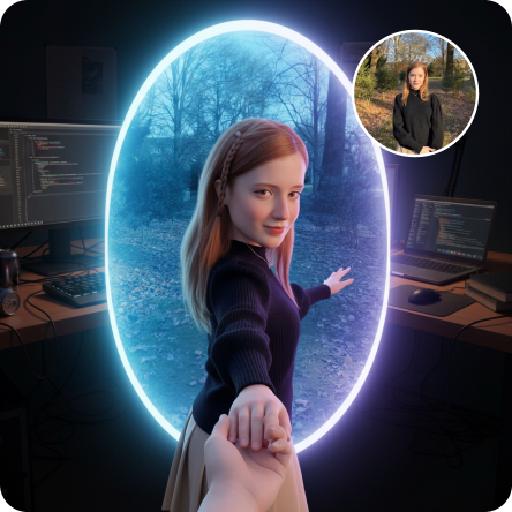
Follow Me Portal AI effects generated image

Follow Me Portal

A 3D chibi-style version of the person in the photo is stepping through a glowing portal, reaching out and holding the viewer’s hand. As the character pulls the viewer forward, they turn back with a dynamic glance, inviting the viewer into their world.Behind the portal is the viewer’s real-life environment: a typical programmer’s study with a desk, monitor, and laptop, rendered in realistic detail. Inside the portal lies the character’s 3D chibi world, inspired by the photo, with a cool blue color scheme that sharply contrasts with the real-world surroundings.The portal itself is a perfectly elliptical frame glowing with mysterious blue and purple light, positioned at the center of the image as a gateway between the two worlds.The scene is captured from a third-person perspective, clearly showing the viewer’s hand being pulled into the character’s world.

Giant Chicken

A realistic photo depicts such a scene: a petite miniature person (whose facial features, gender and age remain unchanged), happily sitting at a huge oversized table in an American fast food restaurant, smiling and interacting joyfully with large pieces of crispy fried chicken and a large bucket of fried chicken and fries. The food has been exaggeratedly enlarged (even larger than this miniature person), and the table appears extremely comical and huge, making this lady seem extremely insignificant compared to the table and the food (the size of the fried chicken is 5 to 10 times that of this person). The size of the table and the food objects is exaggerated using forced perspective. This person is wearing a red and white sports jacket and jeans. Around them are bright and warm movie lights, with a main color of bright red and white. There are neon lights in the background, and the interior of the restaurant is clean and tidy. The fried chicken has a crispy golden yellow texture, presented in a commercial food photography style, with rich details, 8K resolution, hyper-realism, and a playful exaggeration, making people unable to resist their desire to drool.

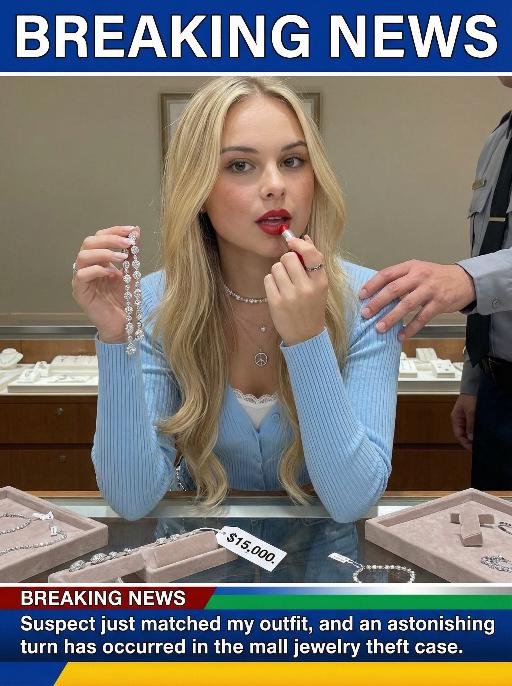
Jewelry Theft AI effects generated image

Jewelry Theft

An interesting breaking news photo has been released. In the picture, the person depicted (with their facial features, gender and age remaining unchanged) is caught in the act of stealing when she is captured on camera. One hand is holding a string of diamond earrings, and the other hand is holding a lipstick, as if nothing has happened as she is applying it to her lips. The main figure occupies 80% of the overall picture. The jewelry counter is in a mess, with velvet jewelry pads scattered around, and a fallen price tag that reads "$15,000". Outside the frame, a security guard's hand is reaching towards her shoulder. Above the picture, there is a prominent large headline text (blue background with white characters): BREAKING NEWS;Below the picture, there is a news text (in red, blue and black color combination): Suspect just matched my outfit and an astonishing turn has occurred in the mall jewelry theft case.

Beast War

Use the user uploaded image as the subject identity source only. Preserve the uploaded subject’s recognizable identity and species. Do not force a specific gender, facial type, hairstyle, clothing design, or species. Transform the uploaded subject into a giant-scale version of itself standing upright in a ruined city battlefield, facing a fixed giant monster in a dramatic standoff. The uploaded subject should keep its original recognizable identity while adapting naturally into an action-ready upright pose with raised limbs or arms. The environment is a destroyed urban battlefield with collapsed skyscrapers, debris, cracked streets, smoke, burning fire, drifting embers, and lava-like fissures in the ground. Dark storm clouds fill the sky, with strong backlight breaking through the clouds, creating epic cinematic contrast. On the opposite side stands a fixed giant monster: massive kaiju body, dark charcoal-black armored skin, rough volcanic reptilian texture, huge muscular limbs, sharp claws, thick legs, large jagged dorsal spines, broad predatory head, glowing eyes, open roaring mouth, sharp fangs, ultra-detailed scales, cracked surfaces, scorched edges, ancient apocalyptic presence. Dramatic rim light from the sky and fiery reflections from below. Photorealistic, ultra detailed, high resolution, 8k, cinematic, sharp focus, volumetric light, realistic texture, epic destruction, intense confrontation energy. no face replacement, no identity change, no extra limbs, no deformed paws, no incorrect anatomy, no blurry monster, no cartoon style, no anime style, no low resolution, no soft details, no duplicated subjects, no oversized head distortion, no chaotic debris, no messy particles, no wrong scale relationship, no unrealistic lighting, no cute monster design

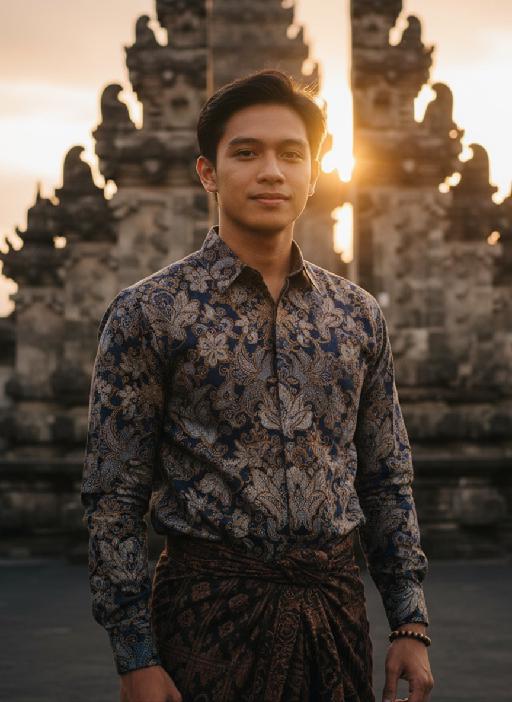
Temple AI effects generated image

Temple

Strictly lock the facial features of the uploaded portrait (preserve facial contours, native Indonesian skin tone, hairstyle and age). close-up photorealistic half-body portrait, model occupies 3/4 of the frame, focus sharply on facial features and serene expression, minimal headroom with zero empty space above the head, the model as the absolute dominant subject, 30-year-old native Indonesian man, native skin tone and natural short black hair, wearing traditional Indonesian batik long-sleeve shirt with deep indigo and gold patterns + dark brown hand-woven sarong, simple wooden beaded bracelet on wrist, standing in front of ancient Balinese stone temple with intricate carvings and tiered meru towers, golden sunset light bathing the scene, soft warm backlighting, hazy orange-pink sky with gentle sun flare bokeh, calm and serene expression, gentle wind brushing his hair, strong nostalgic atmospheric mood, film grain texture, authentic Indonesian cultural details, ultra-detailed fabric and temple carvings, 3:4 aspect ratio, cinematic sunset ambiance

Load more

Next-Gen Multi-Model AI Video Architecture

Vivago AI isn't just one engine—it’s a unified hub for the world’s most advanced video AI. Whether you need cinematic realism or high-speed social content, we provide the right model for your creative vision.

Free Generate


Beauty and Dolphins

Vacation Time

Stellar Tear

Fish Tank Supervisor

Cinematic Quality & Precision Control

Enables 4K resolution with multi-lens motion control, generating delicate scene via text prompts for customized cinematography.​

TRY NOW

Dynamic AV Sync

Auto-generates original audio to avoid copyright issues. Build 3D immersive environments through layered sound design automatically.

TRY NOW

OpenAI Sora 2

​Advanced visual storytelling with unparalleled physics and consistency.

TRY NOW

Kling v2.6 Pro

Industry-leading cinematic image animation and motion control.

TRY NOW

Google Veo 3 & 3.1

Ultra-fast generation with enhanced realism for creative workflows.

TRY NOW

Vivago AI 2.0

Our proprietary model optimized for efficiency, speed, and cost-effective generation.

TRY NOW

Users' Voice

We listen carefully to the opinions of every user.
Free Generate
Contact Us
I tried the Lip Sync feature inside Vivago.ai’s AI Video Generator for my educational podcast, and the results were stunning! The avatar's lip movements perfectly matched my audio recording, creating a professional AI-generated video without complex editing. Compared with tools like OpenAI Sora 2 and Google Veo 3.1, Vivago Image-to-Video delivers fast, studio-quality results online. It saved me hours of post-production work.
ElenaM (Spain)
Vivago’s Image-to-Video AI transformed my marketing workflow. I uploaded a product image and described the launch scene in text, and it generated a 10-second cinematic AI video with background music and dynamic visuals. The output quality rivals Kling v2.6 Pro and Google Veo 3 Fast. It’s now my go-to AI video generator for social media ads and product campaigns.
KenjiT (Japan)
As a digital artist, I use Vivago.ai 2.0 daily for Image-to-Image and AI Image-to-Video creation. The e-book covers and animated visuals I generate for clients look cinematic and professional. Unlike many standalone AI tools, Vivago integrates multiple leading models into one platform, making it easier to create copyright-safe AI images and videos for publishing.
ChenL (China)
I tried the Lip Sync feature inside Vivago.ai’s AI Video Generator for my educational podcast, and the results were stunning! The avatar's lip movements perfectly matched my audio recording, creating a professional AI-generated video without complex editing. Compared with tools like OpenAI Sora 2 and Google Veo 3.1, Vivago Image-to-Video delivers fast, studio-quality results online. It saved me hours of post-production work.
ElenaM (Spain)
Vivago’s Image-to-Video AI transformed my marketing workflow. I uploaded a product image and described the launch scene in text, and it generated a 10-second cinematic AI video with background music and dynamic visuals. The output quality rivals Kling v2.6 Pro and Google Veo 3 Fast. It’s now my go-to AI video generator for social media ads and product campaigns.
KenjiT (Japan)
As a digital artist, I use Vivago.ai 2.0 daily for Image-to-Image and AI Image-to-Video creation. The e-book covers and animated visuals I generate for clients look cinematic and professional. Unlike many standalone AI tools, Vivago integrates multiple leading models into one platform, making it easier to create copyright-safe AI images and videos for publishing.
ChenL (China)
I absolutely love Vivago’s AI Image-to-Video Generator. As a travel blogger, static images often fail to capture real atmosphere, but Vivago helps me turn photos into vivid cinematic AI videos with motion effects. It feels comparable to OpenAI Sora 2 and Google Veo 3.1, but more accessible and faster for creators who need high-quality AI videos online.
LiamK (Australia)
I tried the Lip Sync feature inside Vivago.ai’s AI Video Generator for my educational podcast, and the results were stunning! The avatar's lip movements perfectly matched my audio recording, creating a professional AI-generated video without complex editing. Compared with tools like OpenAI Sora 2 and Google Veo 3.1, Vivago Image-to-Video delivers fast, studio-quality results online. It saved me hours of post-production work.
ElenaM (Spain)
Vivago’s Image-to-Video AI transformed my marketing workflow. I uploaded a product image and described the launch scene in text, and it generated a 10-second cinematic AI video with background music and dynamic visuals. The output quality rivals Kling v2.6 Pro and Google Veo 3 Fast. It’s now my go-to AI video generator for social media ads and product campaigns.
KenjiT (Japan)
As a digital artist, I use Vivago.ai 2.0 daily for Image-to-Image and AI Image-to-Video creation. The e-book covers and animated visuals I generate for clients look cinematic and professional. Unlike many standalone AI tools, Vivago integrates multiple leading models into one platform, making it easier to create copyright-safe AI images and videos for publishing.
ChenL (China)
I absolutely love Vivago’s AI Image-to-Video Generator. As a travel blogger, static images often fail to capture real atmosphere, but Vivago helps me turn photos into vivid cinematic AI videos with motion effects. It feels comparable to OpenAI Sora 2 and Google Veo 3.1, but more accessible and faster for creators who need high-quality AI videos online.
LiamK (Australia)
Using Vivago.ai’s Image-to-Video AI has greatly enhanced my classroom teaching. I transform textbook notes into historical AI videos with cinematic filters and dynamic animations. Compared with tools like Kling v2.6 Pro and Google Veo 3 Fast, Vivago offers faster generation and easier parameter control for educators who need reliable AI video creation.
RajivG (India)
I frequently create AI videos on Vivago and publish them on TikTok and YouTube Shorts. The AI video templates and trending content ideas help me produce viral-ready clips quickly. With Vivago’s integrated models—including advanced video engines similar to OpenAI Sora 2—I can generate anime-style and cinematic social media videos that drive high engagement.
MarieJ (Spain)
What attracts me most about Vivago.ai is not only the powerful AI Video Generator but also the active AIGC creator community. It combines AI Image-to-Video, Text-to-Video, and leading model integrations like Google Veo 3.1 into one creative platform.
TomW (India)
At first, I was hesitant about using AI video tools. But after trying Vivago Image-to-Video, I realized how easy it is to create professional AI-generated videos online. I just upload an image, add a short prompt, and adjust a few settings. The results are cinematic and copyright-safe, which is essential for commercial projects.
HectorC (Mexico)
Using Vivago.ai’s Image-to-Video AI has greatly enhanced my classroom teaching. I transform textbook notes into historical AI videos with cinematic filters and dynamic animations. Compared with tools like Kling v2.6 Pro and Google Veo 3 Fast, Vivago offers faster generation and easier parameter control for educators who need reliable AI video creation.
RajivG (India)
I frequently create AI videos on Vivago and publish them on TikTok and YouTube Shorts. The AI video templates and trending content ideas help me produce viral-ready clips quickly. With Vivago’s integrated models—including advanced video engines similar to OpenAI Sora 2—I can generate anime-style and cinematic social media videos that drive high engagement.
MarieJ (Spain)
What attracts me most about Vivago.ai is not only the powerful AI Video Generator but also the active AIGC creator community. It combines AI Image-to-Video, Text-to-Video, and leading model integrations like Google Veo 3.1 into one creative platform.
TomW (India)
At first, I was hesitant about using AI video tools. But after trying Vivago Image-to-Video, I realized how easy it is to create professional AI-generated videos online. I just upload an image, add a short prompt, and adjust a few settings. The results are cinematic and copyright-safe, which is essential for commercial projects.
HectorC (Mexico)