The Midnight Groove

Create groovy midnight-themed images and videos with The Midnight Groove AI effect by VivaGo.ai. Transform visuals into atmospheric scenes with rhythmic, urban, and neon vibes using AI-powered creative tools. Perfect for music posters, nightlife content, and moody artistic projects. Try it now!

Use Template
arrow

FAQs

What are Effect Templates?

Effect Templates are predefined AI workflows that automatically transform static images into specific visual styles or animated formats, delivering consistent, high-quality results without manual adjustments.

How do I apply Effect Templates?

Select your preferred template > Upload an image > Generate. No text prompts required - templates handle all style parameters.

Where can I find more templates?

Explore 1000+ curated templates in our Explore Hub: https://vivago.ai/studio. New templates added weekly across categories.

What's the pricing?

Daily login grants 100 free credits. Exhausted credits? Choose: 1) Subscribe a membership plan, 2) Get a credit pack. Details: https://vivago.ai/subscribe

More From VIVAGO AI

Garden Lover

Two medium-distance close-up shots of people (their appearances, ages and genders remain unchanged. The older of the two has a semi-transparent effect on their clothing and has warm-toned light effects) stand side by side in white clothing, with a natural posture, facing forward, and their body proportions are very realistic. They stand in front of an American suburban house, which is a vintage old house with a beautiful garden. The warm golden light, soft background light and side light create a hazy film-like atmosphere, conveying a warm, soothing and nostalgic tone. Shot from a medium close-up angle, the shallow depth of field effect highlights the characters. The soft warm light, delicate skin and fabric textures, natural and realistic composition, ultra-realistic high-definition quality and real film texture.

Cyberpunk 2026

The figure from the uploaded image (with unchanged facial features), captured in a medium close-up shot of the upper body, with hair dyed red and wearing black square-framed sunglasses (with transparent red lenses). The figure is dressed in a glossy black leather sportswear set (jacket + track pants) printed with the Chinese character "Fu" pattern, black gloves (holding a sparkler in one hand), and stylish cool black leather shoes, plus an ultra-cool helmet cap adorned with glowing lights that fit the contour of the cap as decorations. The figure stands on a neon-lit city street in cyberpunk style, set against a rainy night backdrop—featuring glowing Chinese neon signboards, wet road surfaces reflecting the lights, towering futuristic buildings, and a blend of blue/red/yellow neon lights. The image features subtle motion blur effects, realistic color grading (with a stark contrast between dark tones and neon hues), and a street photography style. There are fireworks blooming in the background sky, creating a festive atmosphere; the overall style boasts avant-garde photography, trendy fashion sense and a high-end sophisticated feel. At the bottom of the frame, the glowing artistic font "Cyberpunk 2026"—a large handwritten-style effect composed of blooming blue-purple fireworks—floats prominently, with decorative patterns of colorful blooming fireworks beside the text.

Christmas Baby

Transform the figure in the uploaded image into a Christmas-themed style, standing upright and dressed in a retro Christmas knit sweater with red and green color-blocking (printed with white snowflake and reindeer patterns), a long red tasseled scarf, a cute Christmas hat, a full set of Christmas-themed clothing with Christmas pants, and cute fluffy slouch socks on its feet.Scene: A warm American home with a Christmas setup, featuring exquisite gift boxes placed on snow-dusted ground; the background is Christmas decor in a dominant red tone, with a Christmas wreath hung above adorned with red and gold baubles and white flowers, and Christmas trees on both sides dusted with a light layer of snow and decorated with red and gold baubles.Texture & Style: The frame is ultra-high-definition and delicate (cinematic texture at 8K level), with soft and bright lighting, vivid and festive colors, and clear details such as the sweater’s knit texture and the luster of apples. Shot in the style of high-end editorial fashion photography.

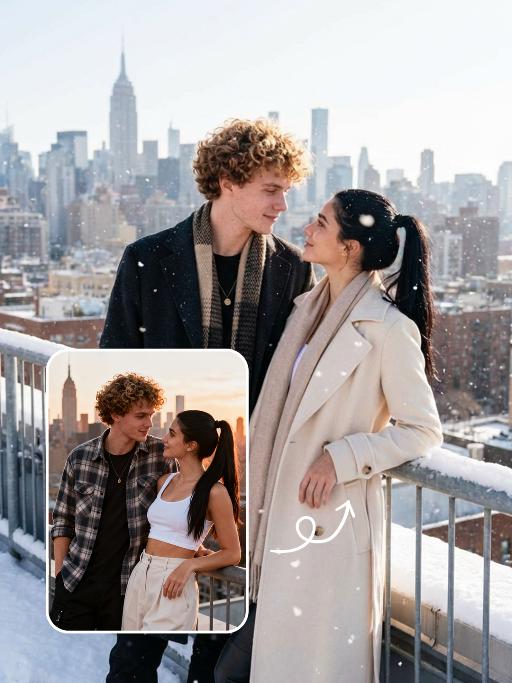
Snow Scene AI effects generated image

Snow Scene

Preserve the facial features of the figure in the image and transform the scene into a photo-realistic romantic winter snow photograph: the figure is wearing a matte black wool knee-length overcoat paired with a thick knit scarf in an interwoven coffee-brown and off-white check pattern (or a matte off-white wool waist-cinched double-breasted coat with gold buttons paired with a matching cashmere mid-length tassel scarf), set against a romantic outdoor scene with heavy snow falling. The lighting is bright natural light (noon sunlight), creating an exquisite and high-end atmosphere. Shoot with a 24mm wide-angle lens to highlight the immersive ambiance of the romantic realistic scene. Scene: Vintage red brick rooftops with light snow traces, frosted silver-toned metal railings with slightly melted snow on the edges; the New York skyline in the background, featuring a scattered mix of light gray glass curtain wall skyscrapers and vintage brownstone buildings with the clear spire of the Empire State Building, and fine snow falling gently. Photography: 85mm f/2.8 lens, winter side light, film texture, cool color tones. Image Quality: 8K ultra-detailed, realistic light and shadow. Atmosphere: A romantic and warm urban architectural snow scene bathed in the afterglow of the setting sun. Shooting Angle: Eye-level with a slight bird's-eye perspective.

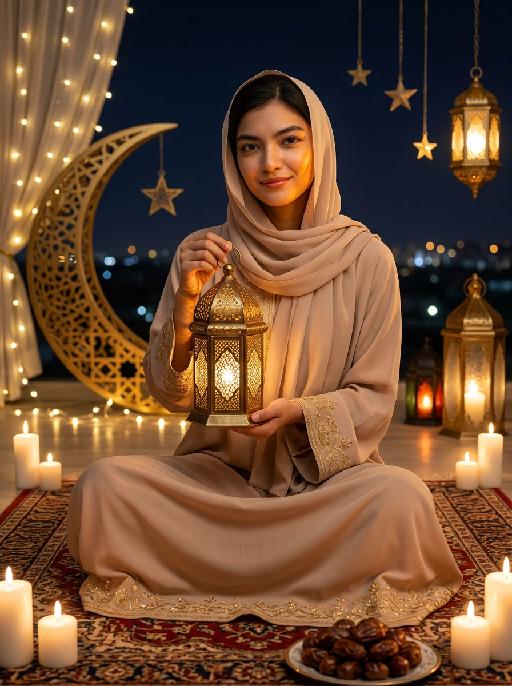
Moon&Lantern AI effects generated image

Moon&Lantern

Maintain the exact same facial features, gender, and age as the person in the uploaded image. A woman wearing a soft beige abaya with delicate gold embroidery on cuffs and hem, paired with a matching beige headscarf. She sits cross-legged on an ornate traditional Persian rug, holding a glowing ornate brass lantern with intricate lattice patterns in both hands, smiling gently at the camera. High contrast lighting, dramatic chiaroscuro, deep soft shadows on one side of the face, warm golden highlights on the other side, backlight creating a soft halo around hair and headscarf. Surrounding elements: lit white candles placed around the rug, a golden plate filled with plump dates in the foreground, a large decorative golden crescent moon with fairy lights, hanging star ornaments and glowing Arabic lanterns in the background, distant blurred city lights under a dark night sky. Cinematic warm lighting, photorealistic portrait, 8K, high detail, cozy and serene Ramadan/Eid atmosphere.

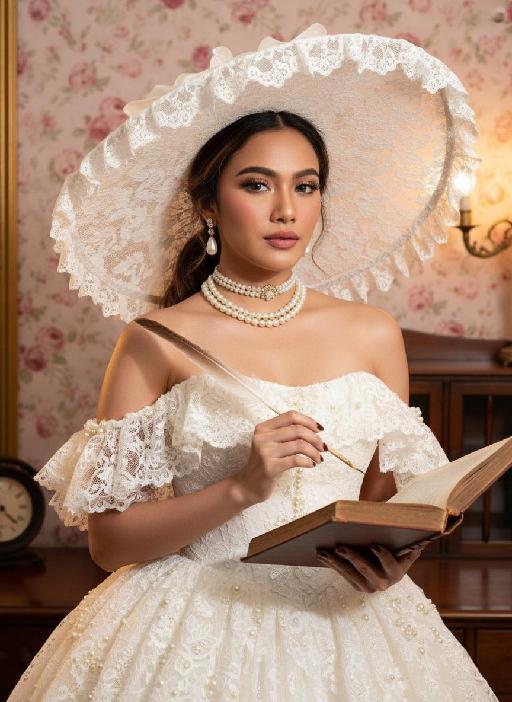
Retro Fashion AI effects generated image

Retro Fashion

Strictly lock the facial features of the uploaded portrait (preserve facial contours, native Indonesian skin tone, hairstyle and age). photorealistic 3:4 half-body portrait of a delicate young woman in her early 20s, with soft vintage makeup, rosy blush, and black hair styled in an elegant updo peeking out from a hat. She wears an oversized white lace wide-brimmed hat with scalloped lace trim, a white strapless lace vintage ballgown adorned with pearl and ruffle embellishments, paired with a layered pearl choker necklace and pearl drop earrings with gold accents. She holds a vintage quill pen in one hand and an old open hardcover book in the other, set against a vintage opulent interior with a soft pink rose floral backdrop, dark wooden furniture, and warm golden ambient lighting, exuding classic Victorian vintage elegance, ultra-high detail, cinematic texture

coconut AI effects generated image

coconut

Strictly lock the facial features of the uploaded portrait (preserve facial contours, native Indonesian skin tone, hairstyle and age completely); he has three-dimensional facial features, dressed in traditional brocade costumes of Indonesian Sumatra, wearing simple traditional Indonesian wooden accessories; the figure stands frontally in the center of the frame, close-up shot with tight framing, occupying an extremely large dominant proportion of the frame, exuding a powerful and domineering aura, with a warm and confident smile on his face, holding a fresh ripe coconut with a straw in his right hand; background is the stunning Bali beach of Indonesia with golden sand, turquoise ocean waves, and swaying tropical palm trees; dappled warm tropical golden hour light falls on the figure, soft backlight outlines the silhouette of the figure's hair, creating sharp light and shadow contrasts that amplify the domineering vibe; 3:4 bust composition, film texture, warm and moist colors, rich details, a tropical Nanyang retro atmosphere, delicate layers of light and shadow, sharp focus on the figure (especially the smile and coconut), ultra-realistic, high definition, strong imposing presence, bold and confident demeanor

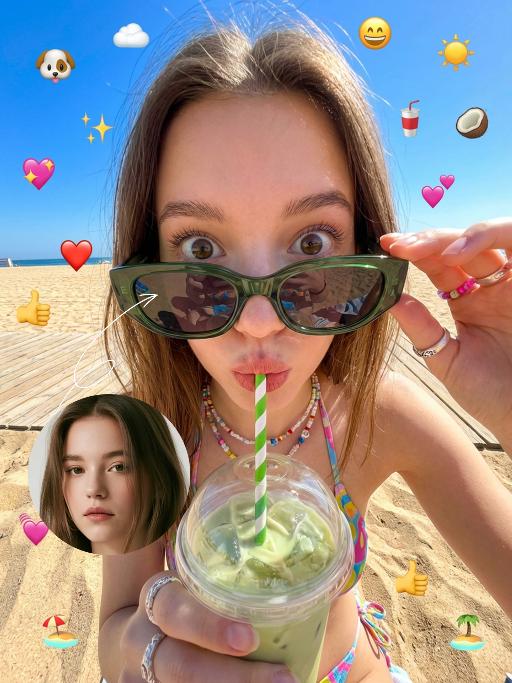
Bikini AI effects generated image

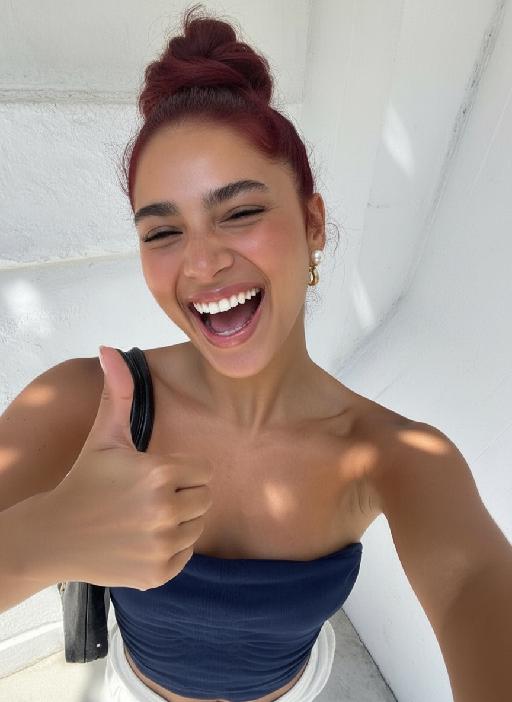
Bikini

The figure from the uploaded image (unchanged facial features, age and gender, with natural facial retouching and a fresh sheer makeup look). An extreme close-up selfie shot from a first-person perspective, the figure stands close to the camera, captured with an iPhone 14 in a casual street photography style. The figure’s eyes are wide open, lips pouted and eyes round in an exaggerated wide stare, with vivid and playful facial expressions; they look straight at the camera, sipping a drink through a green-and-white striped straw. They are wearing a cute colorful bikini, accessorized with colorful Y2K-style jewelry and oversized dark green sunglasses – the sunglasses slip down to the tip of the nose, revealing the eyes, with the surrounding scenery reflected on the lenses. The figure holds a clear plastic cup filled with light green iced drink and ice cubes. The scene is bathed in bright outdoor sunlight, in clear daylight with soft shadows and vibrant natural light. Color palette: bright green, deep blue, light green, warm brown (wooden boardwalk), bright blue (sky). Background: beach, seaside sand, a sun-drenched boardwalk, with a vibrant and casual seaside vibe. The overall style features a dopamine color scheme, Y2K accessories and a distinct Y2K aesthetic. Adorable iPhone emoji-style stickers are randomly scattered around the figure and across the entire frame as decorations (🐶、☁️、✨、😄、☀️、🥥、🥤、💗、❤️、👍、🐶、🏖️、🏝️). The shot uses an ultra-wide-angle lens with extreme perspective, making the figure’s head appear oversized.

Load more

Next-Gen Multi-Model AI Video Architecture

Vivago AI isn't just one engine—it’s a unified hub for the world’s most advanced video AI. Whether you need cinematic realism or high-speed social content, we provide the right model for your creative vision.

Free Generate


Beauty and Dolphins

Vacation Time


Stellar Tear


Fish Tank Supervisor

Cinematic Quality & Precision Control

Enables 4K resolution with multi-lens motion control, generating delicate scene via text prompts for customized cinematography.​

TRY NOW

Dynamic AV Sync

Auto-generates original audio to avoid copyright issues. Build 3D immersive environments through layered sound design automatically.

TRY NOW

OpenAI Sora 2

​Advanced visual storytelling with unparalleled physics and consistency.

TRY NOW

Kling v2.6 Pro

Industry-leading cinematic image animation and motion control.

TRY NOW

Google Veo 3 & 3.1

Ultra-fast generation with enhanced realism for creative workflows.

TRY NOW

Vivago AI 2.0

Our proprietary model optimized for efficiency, speed, and cost-effective generation.

TRY NOW

Users' Voice

We listen carefully to the opinions of every user.
Free Generate
Contact Us
I tried the Lip Sync feature inside Vivago.ai’s AI Video Generator for my educational podcast, and the results were stunning! The avatar's lip movements perfectly matched my audio recording, creating a professional AI-generated video without complex editing. Compared with tools like OpenAI Sora 2 and Google Veo 3.1, Vivago Image-to-Video delivers fast, studio-quality results online. It saved me hours of post-production work.
ElenaM (Spain)
Vivago’s Image-to-Video AI transformed my marketing workflow. I uploaded a product image and described the launch scene in text, and it generated a 10-second cinematic AI video with background music and dynamic visuals. The output quality rivals Kling v2.6 Pro and Google Veo 3 Fast. It’s now my go-to AI video generator for social media ads and product campaigns.
KenjiT (Japan)
As a digital artist, I use Vivago.ai 2.0 daily for Image-to-Image and AI Image-to-Video creation. The e-book covers and animated visuals I generate for clients look cinematic and professional. Unlike many standalone AI tools, Vivago integrates multiple leading models into one platform, making it easier to create copyright-safe AI images and videos for publishing.
ChenL (China)
I tried the Lip Sync feature inside Vivago.ai’s AI Video Generator for my educational podcast, and the results were stunning! The avatar's lip movements perfectly matched my audio recording, creating a professional AI-generated video without complex editing. Compared with tools like OpenAI Sora 2 and Google Veo 3.1, Vivago Image-to-Video delivers fast, studio-quality results online. It saved me hours of post-production work.
ElenaM (Spain)
Vivago’s Image-to-Video AI transformed my marketing workflow. I uploaded a product image and described the launch scene in text, and it generated a 10-second cinematic AI video with background music and dynamic visuals. The output quality rivals Kling v2.6 Pro and Google Veo 3 Fast. It’s now my go-to AI video generator for social media ads and product campaigns.
KenjiT (Japan)
As a digital artist, I use Vivago.ai 2.0 daily for Image-to-Image and AI Image-to-Video creation. The e-book covers and animated visuals I generate for clients look cinematic and professional. Unlike many standalone AI tools, Vivago integrates multiple leading models into one platform, making it easier to create copyright-safe AI images and videos for publishing.
ChenL (China)
I absolutely love Vivago’s AI Image-to-Video Generator. As a travel blogger, static images often fail to capture real atmosphere, but Vivago helps me turn photos into vivid cinematic AI videos with motion effects. It feels comparable to OpenAI Sora 2 and Google Veo 3.1, but more accessible and faster for creators who need high-quality AI videos online.
LiamK (Australia)
I tried the Lip Sync feature inside Vivago.ai’s AI Video Generator for my educational podcast, and the results were stunning! The avatar's lip movements perfectly matched my audio recording, creating a professional AI-generated video without complex editing. Compared with tools like OpenAI Sora 2 and Google Veo 3.1, Vivago Image-to-Video delivers fast, studio-quality results online. It saved me hours of post-production work.
ElenaM (Spain)
Vivago’s Image-to-Video AI transformed my marketing workflow. I uploaded a product image and described the launch scene in text, and it generated a 10-second cinematic AI video with background music and dynamic visuals. The output quality rivals Kling v2.6 Pro and Google Veo 3 Fast. It’s now my go-to AI video generator for social media ads and product campaigns.
KenjiT (Japan)
As a digital artist, I use Vivago.ai 2.0 daily for Image-to-Image and AI Image-to-Video creation. The e-book covers and animated visuals I generate for clients look cinematic and professional. Unlike many standalone AI tools, Vivago integrates multiple leading models into one platform, making it easier to create copyright-safe AI images and videos for publishing.
ChenL (China)
I absolutely love Vivago’s AI Image-to-Video Generator. As a travel blogger, static images often fail to capture real atmosphere, but Vivago helps me turn photos into vivid cinematic AI videos with motion effects. It feels comparable to OpenAI Sora 2 and Google Veo 3.1, but more accessible and faster for creators who need high-quality AI videos online.
LiamK (Australia)
Using Vivago.ai’s Image-to-Video AI has greatly enhanced my classroom teaching. I transform textbook notes into historical AI videos with cinematic filters and dynamic animations. Compared with tools like Kling v2.6 Pro and Google Veo 3 Fast, Vivago offers faster generation and easier parameter control for educators who need reliable AI video creation.
RajivG (India)
I frequently create AI videos on Vivago and publish them on TikTok and YouTube Shorts. The AI video templates and trending content ideas help me produce viral-ready clips quickly. With Vivago’s integrated models—including advanced video engines similar to OpenAI Sora 2—I can generate anime-style and cinematic social media videos that drive high engagement.
MarieJ (Spain)
What attracts me most about Vivago.ai is not only the powerful AI Video Generator but also the active AIGC creator community. It combines AI Image-to-Video, Text-to-Video, and leading model integrations like Google Veo 3.1 into one creative platform.
TomW (India)
At first, I was hesitant about using AI video tools. But after trying Vivago Image-to-Video, I realized how easy it is to create professional AI-generated videos online. I just upload an image, add a short prompt, and adjust a few settings. The results are cinematic and copyright-safe, which is essential for commercial projects.
HectorC (Mexico)
Using Vivago.ai’s Image-to-Video AI has greatly enhanced my classroom teaching. I transform textbook notes into historical AI videos with cinematic filters and dynamic animations. Compared with tools like Kling v2.6 Pro and Google Veo 3 Fast, Vivago offers faster generation and easier parameter control for educators who need reliable AI video creation.
RajivG (India)
I frequently create AI videos on Vivago and publish them on TikTok and YouTube Shorts. The AI video templates and trending content ideas help me produce viral-ready clips quickly. With Vivago’s integrated models—including advanced video engines similar to OpenAI Sora 2—I can generate anime-style and cinematic social media videos that drive high engagement.
MarieJ (Spain)
What attracts me most about Vivago.ai is not only the powerful AI Video Generator but also the active AIGC creator community. It combines AI Image-to-Video, Text-to-Video, and leading model integrations like Google Veo 3.1 into one creative platform.
TomW (India)
At first, I was hesitant about using AI video tools. But after trying Vivago Image-to-Video, I realized how easy it is to create professional AI-generated videos online. I just upload an image, add a short prompt, and adjust a few settings. The results are cinematic and copyright-safe, which is essential for commercial projects.
HectorC (Mexico)