Paws and Treats

Generate vibrant AI art of pets and treats with vivago.ai. Create funny and charming pet moments, toys, snacks, and playtime scenes using generative AI tools. Perfect for pet owners crafting cute or playful visuals instantly. Try our creative AI tools today!

Use Template
arrow

FAQs

What are Effect Templates?

Effect Templates are predefined AI workflows that automatically transform static images into specific visual styles or animated formats, delivering consistent, high-quality results without manual adjustments.

How do I apply Effect Templates?

Select your preferred template > Upload an image > Generate. No text prompts required - templates handle all style parameters.

Where can I find more templates?

Explore 1000+ curated templates in our Explore Hub: https://vivago.ai/studio. New templates added weekly across categories.

What's the pricing?

Daily login grants 100 free credits. Exhausted credits? Choose: 1) Subscribe a membership plan, 2) Get a credit pack. Details: https://vivago.ai/subscribe

More From VIVAGO AI

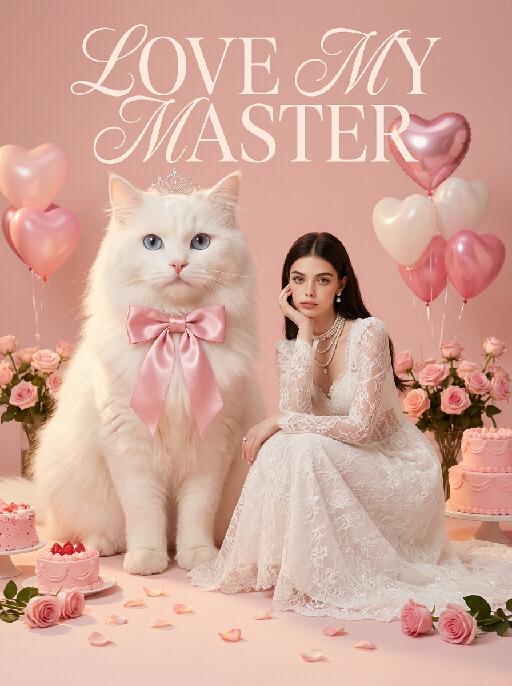
Princess AI effects generated image

Princess

Surreal photography art: In the uploaded picture, the pet (with its features remaining the same, but its size transformed into a huge one with fluffy fur, occupying the left side of the picture and wearing cute accessories), and a person in the uploaded picture (with unchanged facial features, gender, and age) wearing an exquisite white high-end custom dress (wearing delicate accessories), places their chin on their hand and sits slightly on the ground beside the aforementioned pet, with the proportion of the pet and the person in the picture being 1 to 1; the color scheme is pink, with a natural realistic style, a photography studio photography style, the background is a simple pale pink clean photography studio background surface, surrounded by pink cakes and roses, with princess-style, Valentine's Day elements such as heart-shaped decorative balloons, a realistic pet photography style. High-key, soft, bright light, soft diffused shadows, warm low saturation tones (mutton white, pink, warm orange), creating a warm, intimate romantic Valentine's Day atmosphere between the pet and the person, fashionable avant-garde photography art, realistic film-level realistic effect, with a large title artistic design font: LOVE MY MASTER.

Love Yourself AI effects generated image

Love Yourself

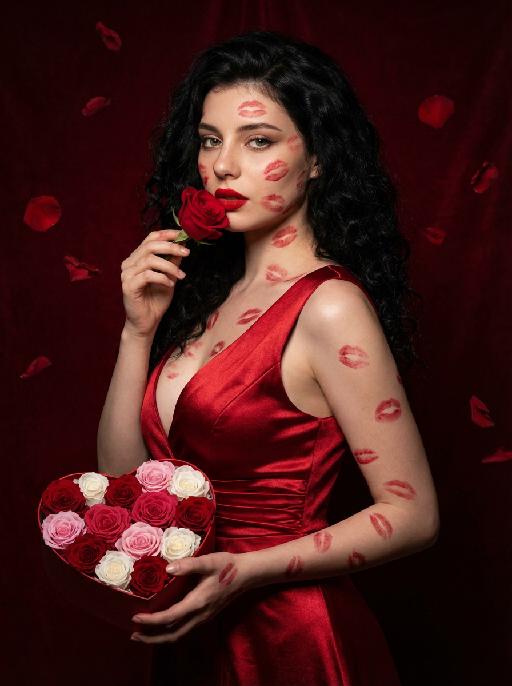
A charming and alluring figure in the uploaded picture (with unchanged facial features, gender and age), stands sideways and turns around, looking at the camera. She has long, fluffy, jet-black curly hair, exquisite eye makeup and a bright matte red lipstick. Red lipstick marks are all over her face, neck, chest and arms. She is wearing a luxurious deep V-neck red satin dress. One hand holds a heart-shaped box filled with various colored roses, and the other hand holds a rose placed near her mouth. Background: A dark red velvet texture studio background. Several red rose petals float slowly in the air in the background. Lighting hint: Low-key high-contrast dramatic light, soft directional highlights shining on her facial features and the satin dress, deep velvet-like shadows to enhance the sexy effect, with a cinematic sense of melancholy and depth. Tone hint: Rich, saturated deep red contrasts with dark black and soft charcoal gray, warm and passionate color combination, with subtle velvet texture in the shadow areas. Style: High-end fashion editing photography, highly realistic detail depiction, precise capture of skin texture and fabric luster, full of charm and allure Valentine's Day theme, with professional photography studio level, fashion pioneer photography.

Trendy Stickers AI effects generated image

Trendy Stickers

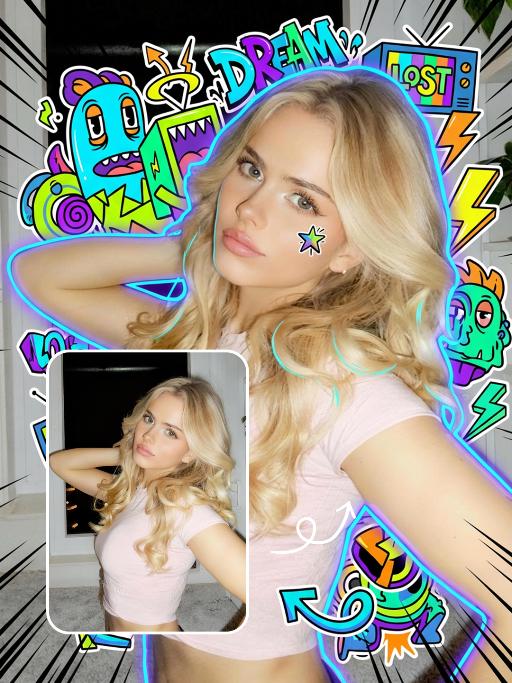
先将上传的图片扩图成3:4的2k超轻尺寸,然后在图片上加入创意涂鸦内容:不要使用固定元素,而是生成与您所识别的视觉主题相匹配的插画元素。如果是酷炫/前卫风格:可以使用箭头、螺栓、涂鸦标签、失真形状、广播盒或抽象的街头艺术怪兽。如果是可爱/甜蜜风格:可以使用独特的角色、心形、星星、糖果、闪光效果和圆形的有机形状。如果选择“虚幻”风格:运用流畅的线条、花瓣、天体以及神奇的漩涡元素。加入的元素风格:平面二维矢量图,粗犷的轮廓,类似贴纸的美感。鲜艳的色彩与写实照片形成对比或相得益彰。 画面的四个边角加入少量的短小的随机黑色动感的漫画式速度线条;人物的周围加上赛博的霓虹发光光效,人物的面部加入一个小涂鸦元素,人物的皮肤轻微磨皮,皮肤自然美颜效果,面部妆容改成欧美流行风格的自然写实的潮流的妆容;写实的人物与写实的场景风格保持不变。

Love Always

Use the user uploaded image as the subject identity source only. Preserve the uploaded subject’s identity, recognizable appearance, and species. Do not force a specific gender, hairstyle, clothing type, or facial structure. Transform the uploaded subject into a peaceful indoor healing scene: reclining naturally on a soft leather sofa, in front of a warm vertical wooden wall, with a calm restful expression. Behind the uploaded subject stands a fixed divine figure of Jesus, ultra detailed and photorealistic, tall and compassionate, wearing a flowing white robe with delicate gold trim, realistic folds, soft luminous fabric, long wavy chestnut-brown hair, full beard, symmetrical refined facial features, warm merciful eyes, soft golden halo, subtle sacred glow. Tiny refined glowing particles in warm gold, ivory, and pale amber shimmer around Jesus’ halo, robe edges, shoulders, and hands, elegant and controlled, not excessive. Jesus gently places both hands on the uploaded subject’s shoulders and keeps them resting there continuously, symbolizing healing, blessing, comfort, and protection. Warm cinematic amber light fills the room. Medium-close composition, uploaded subject reclining in the foreground, Jesus standing behind, wooden wall background, leather sofa texture, sacred peaceful atmosphere, photorealistic, ultra detailed, high resolution, 8k, sharp focus, realistic skin and fabric texture, volumetric warm light, elegant composition. no extra arms, no deformed hands, no chaotic particles, no excessive sparkle, no new identity, no face replacement, no unrealistic anatomy, no distorted shoulders, no floating hands, no duplicated figures, no overexposed halo, no fantasy armor, no cartoon style, no anime style, no low resolution, no blurry face, no incorrect contact between hands and shoulders。

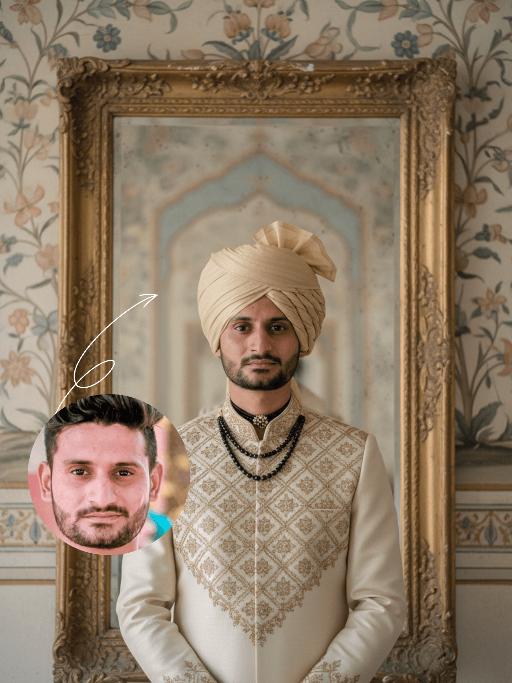
Elegant AI effects generated image

Elegant

Strictly lock the uploaded portrait's identity (preserve facial contours, native Indian skin tone, hairstyle, age). Half-body portrait of a handsome young South Asian man with sharp features and a calm, regal demeanor. He wears a cream-and-gold traditional sherwani with intricate geometric embroidery, a matching soft gold turban, and a striking black beaded choker. Positioned before an 18th-century weathered carved mirror with a gilded frame, behind which lies a faded Mughal-style hand-painted mural in soft blues and golds. Soft, warm diffused light creates a cinematic atmosphere with delicate, layered shadows. The image exudes luxurious, retro romance, featuring a painterly film texture and a soft, desaturated palette of cream, gold, and light gray. Medium-format shot with shallow depth of field to highlight embroidery details and classical elegance

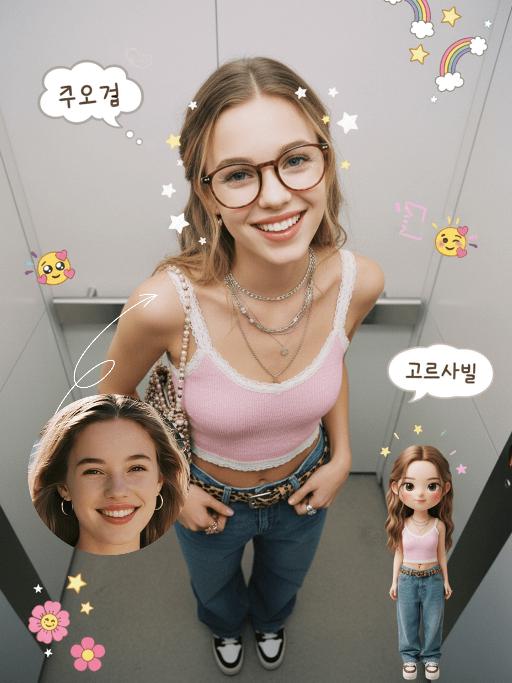
Emoji Plog AI effects generated image

Emoji Plog

The figure from the uploaded image (unchanged facial features, age and gender), create an image in a portrait photography style: a realistic Korean-style sweet and cool young girl (wearing brown-framed glasses, trendy Y2K clothing, and Y2K accessories including necklaces and rings) stands in the center of the frame, shot from a bird’s-eye view, with natural facial retouching and a fresh sheer makeup look. Her head takes up a large proportion of the frame with a strong sense of perspective, featuring the style of casual Instagram selfies plus a subtle decorative texture of cute Instagram emojis. The figure occupies 70% of the frame as the main subject; the negative space is dotted with cute light decorations such as colorful stars and doodles (iPhone emojis). In the bottom right corner is a large, cute 3D cartoon doppelgänger of the girl with the same outfit and pose, accounting for a quarter of the entire frame. Add white/yellow star stickers, cloud emoji speech bubbles with cute Korean text, and a number of lovely emojis to the frame. The scene is set inside an elevator with soft indoor natural light; the decorative elements include white/yellow stars. The work features an avant-garde fashion photography style and a magazine art cover aesthetic, with even soft indoor natural light and no harsh shadows, creating a warm and daily atmosphere. The main color palette is a soft low-saturation scheme (white/light gray/black), accented with bright shades of pink/yellow/leopard brown. The overall image is clean and bright, with a fresh film-like filter effect.

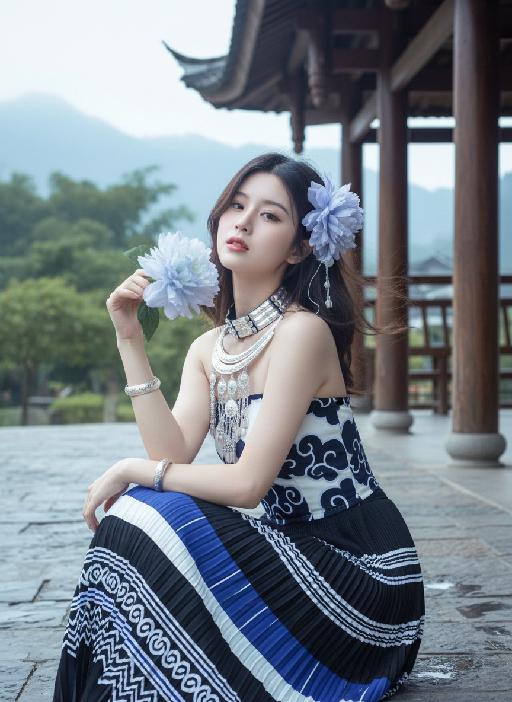
 Violet AI effects generated image

Violet

Strictly enforce facial feature lock: 100% identical to the first reference image, preserving every facial contour, skin texture, eye shape, lip shape, and youthful age with zero deviation. No artistic alteration allowed. Exact 1:1 copy of the original image, no creative interpretation or stylization permitted. A young East Asian woman with a cold, ethereal demeanor sits on damp bluestone paving, body angled 30° to the left, left arm folded across her torso, right hand gently gripping a large pale blue-white gradient flower, right elbow resting on her left forearm, left hand resting lightly on her right knee. She gazes at the camera with a detached, slightly lazy expression, lips pale pink and slightly parted. Her medium-length hair, a soft mix of dark brown and black, is adorned with large, ruffled light blue-purple gradient flower accessories on the right side, with a few strands of hair gently blowing in the breeze. She wears:A multi-layered Miao silver collar with delicate dangling silver beads. A wide, intricately carved silver bracelet on her right wrist. A slim silver bracelet on her left wrist. A strapless top with a crisp white base and bold dark blue swirling cloud motifs. A floor-length pleated skirt in a sharp black, white, and royal blue geometric pattern, with horizontal stripes and wave details on the hem Background is an exact replica of the original Dong-style wooden covered bridge: dark grey tiled roof, polished wooden pillars, distant lush green trees, and hazy mountain peaks under a soft, overcast sky. Precise lighting & tone lock (1:1 match to original):Soft, diffused morning backlight with a gentle, airy halo that wraps around the subject’s hair and shoulders, creating a subtle glow on the damp bluestone ground. The exact color palette of the original image is strictly preserved: cool, low-saturation tones dominated by crisp white, deep navy blue, and matte black, with a soft focus filter that gives the image a delicate, dreamlike cinematic quality. No over-saturation, color shifts, or harsh shadows are allowed. All elements must match the original image pixel-for-pixel; no creative additions or changes permitted.

Load more

Next-Gen Multi-Model AI Video Architecture

Vivago AI isn't just one engine—it’s a unified hub for the world’s most advanced video AI. Whether you need cinematic realism or high-speed social content, we provide the right model for your creative vision.

Free Generate


Beauty and Dolphins

Vacation Time

Stellar Tear

Fish Tank Supervisor

Cinematic Quality & Precision Control

Enables 4K resolution with multi-lens motion control, generating delicate scene via text prompts for customized cinematography.​

TRY NOW

Dynamic AV Sync

Auto-generates original audio to avoid copyright issues. Build 3D immersive environments through layered sound design automatically.

TRY NOW

OpenAI Sora 2

​Advanced visual storytelling with unparalleled physics and consistency.

TRY NOW

Kling v2.6 Pro

Industry-leading cinematic image animation and motion control.

TRY NOW

Google Veo 3 & 3.1

Ultra-fast generation with enhanced realism for creative workflows.

TRY NOW

Vivago AI 2.0

Our proprietary model optimized for efficiency, speed, and cost-effective generation.

TRY NOW

Users' Voice

We listen carefully to the opinions of every user.
Free Generate
Contact Us
I tried the Lip Sync feature inside Vivago.ai’s AI Video Generator for my educational podcast, and the results were stunning! The avatar's lip movements perfectly matched my audio recording, creating a professional AI-generated video without complex editing. Compared with tools like OpenAI Sora 2 and Google Veo 3.1, Vivago Image-to-Video delivers fast, studio-quality results online. It saved me hours of post-production work.
ElenaM (Spain)
Vivago’s Image-to-Video AI transformed my marketing workflow. I uploaded a product image and described the launch scene in text, and it generated a 10-second cinematic AI video with background music and dynamic visuals. The output quality rivals Kling v2.6 Pro and Google Veo 3 Fast. It’s now my go-to AI video generator for social media ads and product campaigns.
KenjiT (Japan)
As a digital artist, I use Vivago.ai 2.0 daily for Image-to-Image and AI Image-to-Video creation. The e-book covers and animated visuals I generate for clients look cinematic and professional. Unlike many standalone AI tools, Vivago integrates multiple leading models into one platform, making it easier to create copyright-safe AI images and videos for publishing.
ChenL (China)
I tried the Lip Sync feature inside Vivago.ai’s AI Video Generator for my educational podcast, and the results were stunning! The avatar's lip movements perfectly matched my audio recording, creating a professional AI-generated video without complex editing. Compared with tools like OpenAI Sora 2 and Google Veo 3.1, Vivago Image-to-Video delivers fast, studio-quality results online. It saved me hours of post-production work.
ElenaM (Spain)
Vivago’s Image-to-Video AI transformed my marketing workflow. I uploaded a product image and described the launch scene in text, and it generated a 10-second cinematic AI video with background music and dynamic visuals. The output quality rivals Kling v2.6 Pro and Google Veo 3 Fast. It’s now my go-to AI video generator for social media ads and product campaigns.
KenjiT (Japan)
As a digital artist, I use Vivago.ai 2.0 daily for Image-to-Image and AI Image-to-Video creation. The e-book covers and animated visuals I generate for clients look cinematic and professional. Unlike many standalone AI tools, Vivago integrates multiple leading models into one platform, making it easier to create copyright-safe AI images and videos for publishing.
ChenL (China)
I absolutely love Vivago’s AI Image-to-Video Generator. As a travel blogger, static images often fail to capture real atmosphere, but Vivago helps me turn photos into vivid cinematic AI videos with motion effects. It feels comparable to OpenAI Sora 2 and Google Veo 3.1, but more accessible and faster for creators who need high-quality AI videos online.
LiamK (Australia)
I tried the Lip Sync feature inside Vivago.ai’s AI Video Generator for my educational podcast, and the results were stunning! The avatar's lip movements perfectly matched my audio recording, creating a professional AI-generated video without complex editing. Compared with tools like OpenAI Sora 2 and Google Veo 3.1, Vivago Image-to-Video delivers fast, studio-quality results online. It saved me hours of post-production work.
ElenaM (Spain)
Vivago’s Image-to-Video AI transformed my marketing workflow. I uploaded a product image and described the launch scene in text, and it generated a 10-second cinematic AI video with background music and dynamic visuals. The output quality rivals Kling v2.6 Pro and Google Veo 3 Fast. It’s now my go-to AI video generator for social media ads and product campaigns.
KenjiT (Japan)
As a digital artist, I use Vivago.ai 2.0 daily for Image-to-Image and AI Image-to-Video creation. The e-book covers and animated visuals I generate for clients look cinematic and professional. Unlike many standalone AI tools, Vivago integrates multiple leading models into one platform, making it easier to create copyright-safe AI images and videos for publishing.
ChenL (China)
I absolutely love Vivago’s AI Image-to-Video Generator. As a travel blogger, static images often fail to capture real atmosphere, but Vivago helps me turn photos into vivid cinematic AI videos with motion effects. It feels comparable to OpenAI Sora 2 and Google Veo 3.1, but more accessible and faster for creators who need high-quality AI videos online.
LiamK (Australia)
Using Vivago.ai’s Image-to-Video AI has greatly enhanced my classroom teaching. I transform textbook notes into historical AI videos with cinematic filters and dynamic animations. Compared with tools like Kling v2.6 Pro and Google Veo 3 Fast, Vivago offers faster generation and easier parameter control for educators who need reliable AI video creation.
RajivG (India)
I frequently create AI videos on Vivago and publish them on TikTok and YouTube Shorts. The AI video templates and trending content ideas help me produce viral-ready clips quickly. With Vivago’s integrated models—including advanced video engines similar to OpenAI Sora 2—I can generate anime-style and cinematic social media videos that drive high engagement.
MarieJ (Spain)
What attracts me most about Vivago.ai is not only the powerful AI Video Generator but also the active AIGC creator community. It combines AI Image-to-Video, Text-to-Video, and leading model integrations like Google Veo 3.1 into one creative platform.
TomW (India)
At first, I was hesitant about using AI video tools. But after trying Vivago Image-to-Video, I realized how easy it is to create professional AI-generated videos online. I just upload an image, add a short prompt, and adjust a few settings. The results are cinematic and copyright-safe, which is essential for commercial projects.
HectorC (Mexico)
Using Vivago.ai’s Image-to-Video AI has greatly enhanced my classroom teaching. I transform textbook notes into historical AI videos with cinematic filters and dynamic animations. Compared with tools like Kling v2.6 Pro and Google Veo 3 Fast, Vivago offers faster generation and easier parameter control for educators who need reliable AI video creation.
RajivG (India)
I frequently create AI videos on Vivago and publish them on TikTok and YouTube Shorts. The AI video templates and trending content ideas help me produce viral-ready clips quickly. With Vivago’s integrated models—including advanced video engines similar to OpenAI Sora 2—I can generate anime-style and cinematic social media videos that drive high engagement.
MarieJ (Spain)
What attracts me most about Vivago.ai is not only the powerful AI Video Generator but also the active AIGC creator community. It combines AI Image-to-Video, Text-to-Video, and leading model integrations like Google Veo 3.1 into one creative platform.
TomW (India)
At first, I was hesitant about using AI video tools. But after trying Vivago Image-to-Video, I realized how easy it is to create professional AI-generated videos online. I just upload an image, add a short prompt, and adjust a few settings. The results are cinematic and copyright-safe, which is essential for commercial projects.
HectorC (Mexico)